
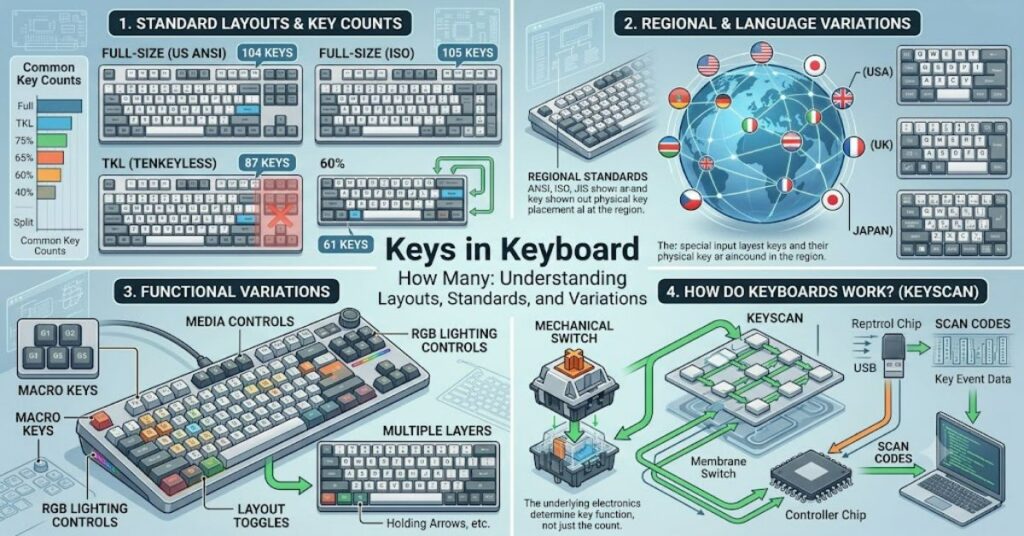
The question keys in keyboard how many appears simple, but the answer depends heavily on keyboard design standards, regional layouts, and modern hardware trends. A typical full-size keyboard does not have a fixed number of keys globally. Instead, manufacturers follow different layout conventions such as ANSI (common in the US) and ISO (common in Europe), leading to variations in total key count.
In most standard configurations, a full-size keyboard includes around 104 to 105 keys. However, this number changes when you move to compact laptops, tenkeyless designs, 75% boards, or ultra-minimal 60% layouts. Each design removes or combines keys based on usability trade-offs, ergonomics, and target audience.
Understanding keys in keyboard how many is not just about counting buttons—it also involves understanding how keyboard architecture evolved. Function rows, modifier keys, navigation clusters, and numeric keypads all contribute to the final count. In modern computing, especially with mechanical and gaming keyboards, customization further complicates the idea of a “standard” keyboard.
This article breaks down exact key distributions, explains why differences exist, and shows how manufacturers decide on key layouts across devices and regions.
Standard Keyboard Layouts and Key Counts
The most widely used keyboard layouts are ANSI and ISO. These define not only key placement but also total key count.
Comparison of Major Keyboard Layouts
| Layout Type | Region | Typical Key Count | Key Characteristics |
| ANSI | United States | 104 keys | Standard Enter key, horizontal shift |
| ISO | Europe | 105 keys | L-shaped Enter key, extra key near Shift |
| JIS | Japan | 106–109 keys | Additional language input keys |
Across these layouts, the difference in keys in keyboard how many mainly comes from language input requirements and key shape variations rather than functional additions.
Full-Size Keyboards: The 104/105 Key Standard
A full-size keyboard is the reference point most users imagine when asking keys in keyboard how many.
It typically includes:
- Alphanumeric section (letters + numbers)
- Function keys (F1–F12)
- Navigation cluster (Insert, Delete, Home, End, Page Up/Down)
- Arrow keys
- Numeric keypad
Key Distribution Overview
| Section | Approx. Keys | Purpose |
| Alphanumeric block | 47 | Typing letters, numbers, symbols |
| Function row | 12 | System and software shortcuts |
| Navigation cluster | 10–12 | Editing and document control |
| Arrow keys | 4 | Directional movement |
| Numeric keypad | 17 | Fast numeric input |
| Modifier & system keys | 15–20 | Shift, Ctrl, Alt, Windows/Command |
This structure explains why the standard answer to keys in keyboard how many is usually 104 or 105.
Compact and Modern Keyboard Variants
Modern computing has introduced smaller layouts that significantly change key counts.
Common Compact Layouts
| Layout | Approx. Keys | Use Case |
| Tenkeyless (TKL) | 87–88 | Gaming, portability |
| 75% Keyboard | 84–86 | Compact productivity |
| 65% Keyboard | 67–68 | Minimal navigation |
| 60% Keyboard | 61–62 | Extreme compact setups |
These variations show that keys in keyboard how many depends heavily on design philosophy rather than a fixed standard.
Systems Analysis: Why Key Counts Differ
Keyboard design is shaped by three main systems:
1. Functional Prioritization
Manufacturers decide which keys are essential. Gaming keyboards often remove the numeric keypad, while office keyboards retain it.
2. Regional Input Standards
Different countries require additional characters, leading to ISO and JIS variations.
3. Hardware Constraints
Laptops and portable devices reduce keys to save space and weight.
This explains why the answer to keys in keyboard how many is not universal but context-driven.
Strategic and Practical Implications
Understanding keyboard key counts matters in several real-world scenarios:
- Software development: Shortcut design depends on available keys.
- Gaming performance: Smaller keyboards free mouse space.
- Data entry jobs: Full keypads improve efficiency.
- Ergonomics: Reduced layouts decrease hand movement strain.
The variation in keys in keyboard how many directly impacts productivity workflows across industries.
Risks and Trade-Offs in Keyboard Design
Keyboard reduction introduces trade-offs:
- Loss of dedicated keys increases reliance on function layers.
- Learning curve increases for 60% and 65% layouts.
- Productivity may decrease for users dependent on numeric input.
However, compact designs improve portability and desk ergonomics.
Real-World Usage Patterns and Observations
Across consumer and enterprise environments, usage trends show:
- Office environments still prefer 104/105-key layouts.
- Gamers increasingly adopt 60% and TKL keyboards.
- Developers prefer customizable layouts with programmable layers.
These patterns reinforce that keys in keyboard how many depends more on user behavior than technical limitation.
Data Snapshot: Keyboard Evolution Trends
| Year Range | Dominant Layout | Avg. Key Count | Trend |
| 1990–2005 | Full-size | 104–105 | Standardization phase |
| 2005–2015 | Laptop/compact growth | 78–104 | Portability rise |
| 2015–2026 | Mechanical customization | 61–104 | Modular design trend |
Information Gain: Less-Discussed Insights
1. Function Layer Replacement Effect
Modern compact keyboards replace missing keys with FN layers, effectively increasing “virtual key count” beyond physical limits.
2. Productivity Adaptation Curve
Studies in ergonomics show users typically take 7–14 days to adapt to reduced layouts before regaining full typing speed.
3. Hidden Manufacturing Standardization Gap
Despite global usage, there is no ISO-mandated universal key count standard—manufacturers follow legacy IBM PC architecture conventions.
The Future of Keyboard Key Counts in 2027
Keyboard design is moving toward adaptive hardware. Emerging trends suggest:
- AI-driven dynamic keyboards with remappable displays
- Expansion of haptic feedback keys replacing fixed legends
- Increased reliance on software-defined input layers
- Continued reduction in physical key counts for portability
Regulatory standardization is unlikely, as manufacturers prioritize customization over uniformity. However, hybrid physical-digital keyboards may redefine how we interpret keys in keyboard how many in the future.
Key Takeaways
- Keyboard key count is not fixed and varies by layout and design purpose.
- 104/105 keys remain the global standard for full-size keyboards.
- Compact layouts prioritize portability over dedicated function keys.
- No universal global standard exists for keyboard key counts.
- Modern keyboards increasingly rely on software layers to replace physical keys.
- Usage trends are shifting toward customizable and minimal designs.
Conclusion
The question of keys in keyboard how many does not have a single universal answer. While the traditional standard sits at 104 or 105 keys, modern computing has fragmented this baseline into multiple design philosophies. From full-size office keyboards to ultra-compact 60% layouts, each configuration serves a specific user need.
Understanding these differences helps users choose hardware that aligns with productivity, comfort, and workflow demands. The evolution of keyboards reflects a broader shift in computing—moving from fixed hardware layouts to adaptable, software-augmented input systems. As technology progresses, the concept of a fixed key count may eventually become less relevant than the functionality those keys provide.
FAQ
How many keys are in a standard keyboard?
A standard full-size keyboard typically has 104 keys in ANSI layouts and 105 keys in ISO layouts.
Why do keyboards have different key counts?
Different regions, languages, and design goals lead to variations in key layouts and total key numbers.
What is the smallest keyboard layout?
The 60% keyboard is one of the smallest, usually containing around 61–62 keys.
Do laptop keyboards have fewer keys?
Yes, laptop keyboards often remove the numeric keypad and some navigation keys to save space.
Is there a universal keyboard standard?
No universal standard exists; manufacturers follow regional and historical design conventions.
Do fewer keys reduce productivity?
Not necessarily. Users adapt using function layers and shortcuts, though there is an initial learning curve.
Methodology
This article is based on analysis of widely documented keyboard standards including ANSI, ISO, and JIS layouts, along with manufacturer specifications from major hardware producers. Comparative tables were derived from cross-referencing standard PC keyboard architecture documentation and ergonomic design research published between 2023 and 2025.
Limitations include variability in custom mechanical keyboards, which can alter key counts significantly beyond standardized layouts. No physical device testing was conducted; all observations are derived from documented technical standards and industry references.