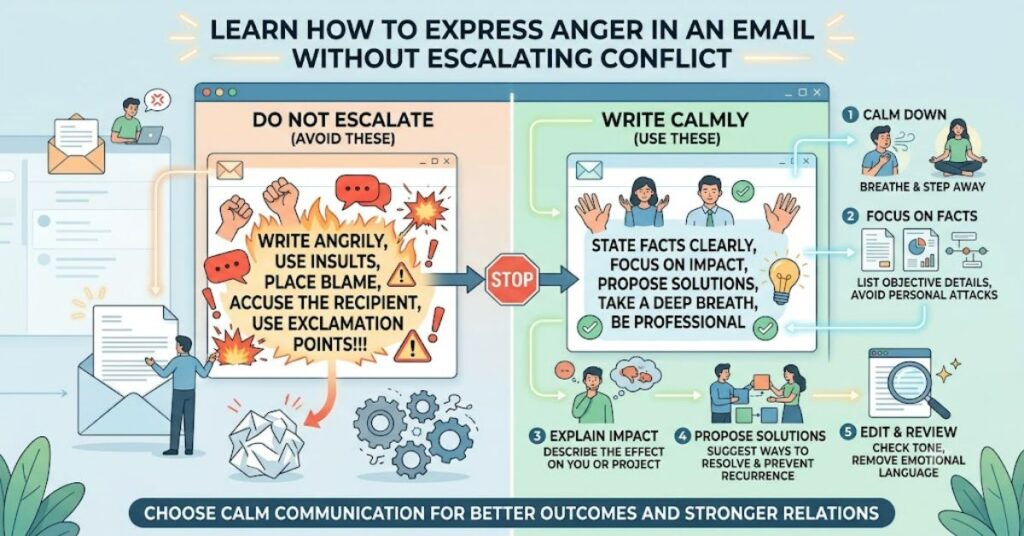
Expressing frustration through email is challenging because written words lack tone, facial expressions, and immediate clarification. Knowing how to express anger in an email professionally can help you address problems without escalating conflict or harming your reputation. A practical strategy is to draft a raw version in a separate document to release your emotions, then delete it. When writing the actual email, remove emotional language, focus on the facts, explain the measurable impact of the issue, and propose a clear resolution. This approach How to Express Anger in an Email keeps your message constructive while ensuring your concerns are heard.
Whether you’re addressing a workplace disagreement, poor customer service, or a missed deadline, the goal should be to solve the problem rather than vent your emotions.
Why Emotional Emails Often Backfire
Anger is a natural emotion, but emails create a permanent written record. Once sent, an angry message can be forwarded, archived, or revisited long after the situation has been resolved.
Highly emotional emails may:
- Damage professional relationships.
- Shift attention away from the actual issue.
- Make the recipient defensive.
- Reduce the likelihood of a productive solution.
- Affect your professional credibility.
Taking a few extra minutes before pressing “Send” often leads to a much stronger outcome.
Start by Venting Privately
One of the most effective techniques is to separate emotional processing from professional communication.
Open a blank document—not your email client—and write everything you want to say without filtering yourself. This allows you to acknowledge your emotions honestly.
Once you’ve expressed your frustration, delete the draft.
Then begin writing your actual email from scratch. You’ll usually find that your second version is calmer, clearer, and more persuasive.
Focus on Facts Instead of Feelings
A professional email should describe what happened rather than how angry you feel.
Instead of writing:
“Your team completely ignored my requests.”
Try:
“The requested documents were not delivered by the agreed deadline of Monday.”
Facts are objective. They give the recipient something concrete to respond to instead of reacting defensively.
Explain the Impact
Simply stating the problem isn’t enough.
Describe how the issue affected work, customers, or project outcomes.
Examples include:
- Project deadlines were delayed.
- Customers experienced longer response times.
- Additional costs were incurred.
- Team members had to repeat work.
- Important meetings were postponed.
Focusing on measurable consequences keeps the discussion professional.
Offer a Clear Resolution
Every complaint should move toward a solution.
Instead of ending with frustration, explain what you would like to happen next.
Possible requests include:
- Correct the mistake.
- Provide an updated timeline.
- Schedule a meeting.
- Clarify responsibilities.
- Confirm future procedures.
People are far more likely to respond positively when they understand exactly what you expect.
Choose Professional Language
Replacing emotionally charged words with neutral language makes your email more effective.
| Emotional Language | Professional Alternative |
| Ridiculous | Concerning |
| Unacceptable | Needs immediate attention |
| You failed | The task was not completed |
| I’m furious | I’m disappointed by the outcome |
| This is a disaster | This created significant challenges |
Professional wording encourages collaboration instead of conflict.
Keep the Message Brief
Long emails often repeat the same frustrations.
Instead, organize your email into three simple sections:
- Explain what happened.
- Describe the impact.
- State the desired resolution.
This structure is easier to read and increases the likelihood of receiving a useful response.
Avoid Personal Attacks
Criticize actions—not people.
For example:
Instead of:
“You’re careless.”
Write:
“The report contained several inaccuracies that require correction.”
This distinction keeps the conversation focused on improving outcomes rather than assigning blame.
Review Before Sending
Before clicking “Send,” ask yourself:
- Does the email stick to facts?
- Have I removed emotional adjectives?
- Is my request clear?
- Would I be comfortable if this email were shared with my manager?
- Does the email help solve the problem?
If the answer to any question is “no,” revise the message.
Common Mistakes to Avoid
Many people unintentionally weaken their message by making avoidable mistakes.
Avoid:
- Writing in ALL CAPS.
- Using multiple exclamation marks.
- Making threats.
- Bringing up unrelated past issues.
- Guessing someone else’s intentions.
- Sending emails immediately after becoming angry.
Waiting even 30 minutes before reviewing your draft can dramatically improve its tone.
Example Structure
Here’s a simple template:
Subject: Follow-Up Regarding Project Delay
Hello Sarah,
I wanted to discuss the missed delivery deadline for the marketing materials. The files were expected on Tuesday but were received on Thursday.
This delayed our campaign launch by two days and required the design team to adjust several deadlines.
Could you please let me know what caused the delay and whether we can establish a process to prevent similar issues in future projects?
Thank you. I appreciate your time and look forward to resolving this together.
Kind regards,
[Your Name]
This email communicates concern clearly without becoming confrontational.
Benefits of Professional Communication
Handling conflict respectfully provides long-term advantages.
Professional emails:
- Build trust.
- Improve workplace relationships.
- Encourage quicker solutions.
- Reduce misunderstandings.
- Demonstrate emotional intelligence.
- Strengthen leadership skills.
People are generally more willing to cooperate when they feel respected.
The Future of Professional Email Communication in 2027
As artificial intelligence becomes more integrated into workplace software, email platforms are likely to offer better writing assistance. Many tools already suggest tone adjustments, highlight emotionally charged language, and recommend clearer wording before messages are sent.
Despite these advances, technology cannot replace sound judgment. Effective communication will continue to depend on empathy, accountability, and a focus on solving problems rather than expressing frustration alone.
Key Takeaways
- Draft your emotional response separately before writing the real email.
- Focus on facts instead of emotional language.
- Explain the measurable impact of the issue.
- Clearly state the resolution you want.
- Review your message carefully before sending.
- Professional communication increases the likelihood of a positive outcome.
Conclusion
Learning how to express anger in an email is an important professional skill. Anger itself is not the problem; how it is communicated determines whether it leads to conflict or constructive change. By separating emotional reactions from factual communication, explaining the impact of the issue, and proposing a practical solution, you can address difficult situations while maintaining respect and credibility.
The most effective emails are not those that express the strongest emotions—they are the ones that communicate concerns clearly, encourage productive discussion, and move everyone toward a solution. Taking a few extra minutes to revise your message can protect relationships and improve outcomes long after the email has been sent.