
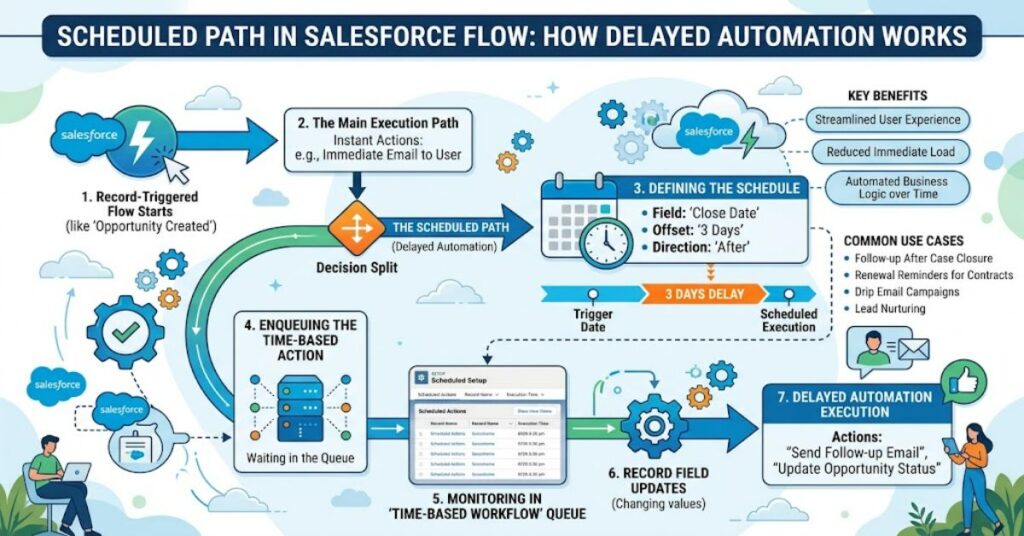
Salesforce Flow has become the preferred automation tool for organizations looking to streamline business processes. One of its most useful features is the scheduled path, which enables actions to occur after a specified delay instead of immediately when a record changes. Rather than executing every automation step at once, administrators can configure flows to wait minutes, hours, or days before continuing. Scheduled paths can also run relative to a date field stored on the record, making them ideal for reminders, follow-up emails, and time-based record updates.
Whether you’re building customer onboarding processes, sales follow-ups, or service reminders, understanding how scheduled paths work can make your automation more flexible and reliable.
What Is a Scheduled Path?
A scheduled path is a feature available in Salesforce Record-Triggered Flows. It allows administrators to delay specific automation actions after a record is created or updated.
Unlike an immediate path, which executes as soon as the flow runs, a scheduled path waits until the configured time before performing actions.
For example:
- Send a welcome email two days after an account is created.
- Create a follow-up task seven days after an opportunity enters a new stage.
- Update a customer’s status 30 days after a contract starts.
- Notify a support manager one day before a case reaches its SLA deadline.
This flexibility makes Salesforce automation far more powerful than simple trigger-based workflows.
How Scheduled Paths Work
When a record meets the flow’s entry conditions, Salesforce evaluates the scheduled path configuration.
The administrator defines:
| Setting | Purpose |
| Time Source | Determines which date or datetime field is used |
| Offset Value | Number of minutes, hours, or days to wait |
| Offset Direction | Before or after the selected date |
| Scheduled Actions | Tasks, emails, updates, or other flow elements |
Instead of executing immediately, Salesforce stores the scheduled action in its automation queue until the designated time arrives.
If the record no longer qualifies before execution, Salesforce may remove the scheduled action depending on how the flow is configured.
Common Use Cases
Scheduled paths are useful across many departments.
Sales
Sales teams often need reminders after a deal reaches a milestone.
Examples include:
- Reminder to contact a lead after three days
- Follow-up email after a product demonstration
- Opportunity review after two weeks
Customer Service
Support organizations rely on scheduled automation for SLA management.
Examples include:
- Notify supervisors before deadlines
- Escalate unresolved cases
- Send customer satisfaction surveys after case closure
Marketing
Marketing automation frequently depends on timing.
Examples include:
- Welcome campaigns
- Trial expiration reminders
- Promotional emails before subscription renewal
Human Resources
HR departments use scheduled paths for onboarding.
Typical automations include:
- Equipment requests
- Training reminders
- Performance review scheduling
Benefits of Using Scheduled Paths
Organizations gain several advantages.
Better Customer Experience
Customers receive communications at meaningful times rather than all at once.
Reduced Manual Work
Employees no longer need to remember repetitive follow-up tasks.
Improved Consistency
Every qualifying record follows the same timeline.
Easier Maintenance
Everything is managed within Salesforce Flow rather than external scheduling tools.
More Flexible Automation
Different scheduled paths can exist within the same flow, allowing multiple timelines for different business needs.
Scheduled Path vs Immediate Path
| Feature | Immediate Path | Scheduled Path |
| Execution | Instantly | Delayed |
| Best For | Real-time updates | Follow-ups and reminders |
| Waiting Period | None | Minutes, hours, or days |
| Uses Date Fields | No | Yes |
| Supports Time-Based Automation | No | Yes |
Immediate paths are ideal for validation or instant record updates, while scheduled paths are designed for business events that should happen later.
Best Practices
Building reliable automation requires thoughtful planning.
Use Clear Entry Criteria
Only schedule actions when records truly require delayed processing.
Choose the Correct Time Source
Verify that your selected date field always contains valid data.
Avoid Unnecessary Delays
Only delay actions when business processes require it.
Test Thoroughly
Use Salesforce’s Flow testing tools and sandbox environments before deploying to production.
Monitor Scheduled Interviews
Salesforce allows administrators to review pending scheduled flow interviews, helping identify issues before they affect users.
Common Challenges
Although scheduled paths are powerful, they have limitations.
Record Changes
If important fields change before the scheduled action runs, the automation may no longer behave as expected.
Large Data Volumes
Organizations with thousands of scheduled actions should monitor automation performance and governor limits.
Time Zone Considerations
Businesses operating internationally should verify how date and time calculations behave across different user time zones.
Flow Updates
Changing an active flow version may affect future scheduled actions. Proper deployment planning helps avoid unexpected results.
Practical Example
Imagine a software company offering a free 14-day trial.
When a new customer signs up:
- The record is created.
- The flow runs immediately.
- A scheduled path waits for 10 days.
- Salesforce automatically sends a reminder email.
- Two days later, another scheduled path creates a follow-up task for the sales representative.
Without scheduled paths, administrators would need multiple automation tools or manual reminders.
The Future of Scheduled Paths in 2027
As Salesforce continues expanding Flow capabilities, scheduled paths are expected to become even more central to business automation. Organizations are increasingly replacing older Workflow Rules and Process Builder automations with Flow-based solutions, making scheduled paths a standard approach for time-dependent processes.
Future improvements may include enhanced monitoring, better debugging tools, deeper AI-assisted automation recommendations, and more flexible scheduling options. Businesses adopting Flow today will likely benefit from easier upgrades as Salesforce continues investing in its automation platform.
Key Takeaways
- Scheduled paths delay automation until a defined time.
- They simplify follow-up emails, reminders, and record updates.
- Proper testing reduces unexpected automation issues.
- Date-based scheduling creates more personalized customer experiences.
- Salesforce Flow provides a scalable replacement for older automation tools.
Conclusion
A scheduled path is one of the most valuable features available in Salesforce Flow for organizations that need time-based automation. Instead of performing every action immediately, it allows businesses to schedule emails, task creation, record updates, and notifications exactly when they are needed. This results in smoother customer journeys, improved operational efficiency, and reduced manual effort.
When combined with thoughtful planning, accurate entry conditions, and proper testing, scheduled paths become a dependable foundation for modern Salesforce automation. As more organizations migrate from Workflow Rules and Process Builder to Flow, mastering scheduled paths is becoming an essential skill for Salesforce administrators and developers.
Frequently Asked Questions
What is a scheduled path in Salesforce Flow?
A scheduled path delays automation actions until a specified time after a record is created or updated, or relative to a selected date field.
Can a flow have multiple scheduled paths?
Yes. A single record-triggered flow can include multiple scheduled paths with different timing and actions.
Does a scheduled path replace Workflow Rules?
In many cases, yes. Salesforce recommends using Flow as the primary automation platform for new development.
What happens if the record changes before execution?
Depending on the flow configuration and entry conditions, Salesforce may update or remove the pending scheduled action.
When should I use a scheduled path?
Use scheduled paths whenever business processes require delayed actions such as reminders, follow-up emails, contract notifications, or recurring business events.
References
- Salesforce. (2025). Salesforce Flow Documentation. https://help.salesforce.com
- Salesforce Developers. (2025). Flow Builder Guide. https://developer.salesforce.com