
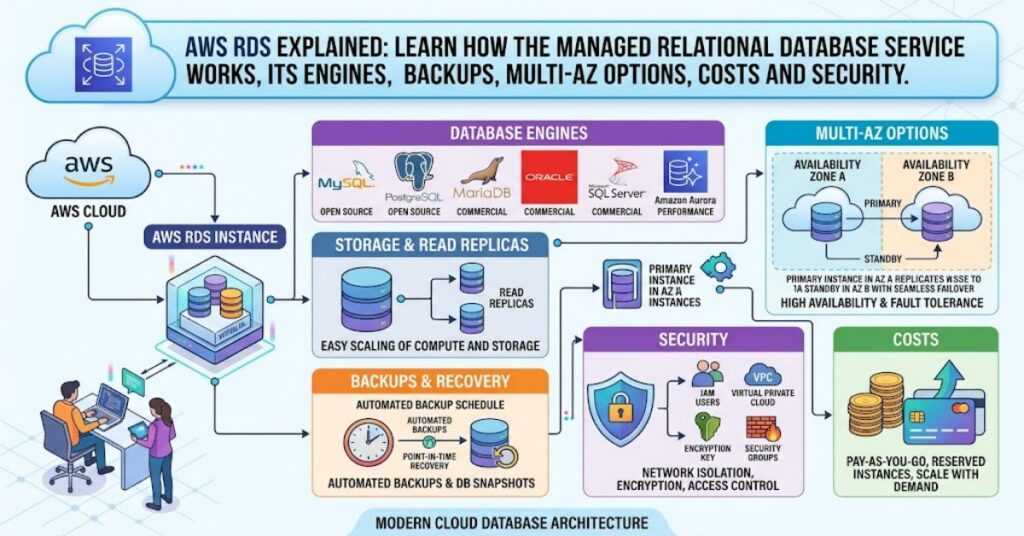
RDS, short for Amazon Relational Database Service, is Amazon Web Services’ managed service for running relational databases in the cloud. Instead of buying servers, installing a database engine, designing storage and building every backup process independently, an organisation can provision a managed database instance and let AWS handle much of the underlying infrastructure. AWS introduced Amazon RDS on 26 October 2009 with the stated goal of making relational databases easier to set up, operate and scale in the cloud.
That does not mean RDS is a database that requires no administration. It is better understood as a managed operating layer around familiar relational database engines. The database engine still matters. So do schema design, SQL queries, indexes, permissions, connection management, application architecture and workload characteristics.
The service currently supports major relational options including Db2, MariaDB, Microsoft SQL Server, MySQL, Oracle and PostgreSQL, while Amazon Aurora provides MySQL- and PostgreSQL-compatible alternatives within the wider RDS family. AWS documentation also shows that supported engine versions vary by instance class and Region, making version and regional compatibility important during planning.
For businesses, the central question is therefore not simply whether RDS is powerful. It is whether the reduction in infrastructure administration justifies the service’s ongoing compute, storage, backup, networking and licensing costs for a particular workload.
What Is Amazon RDS?
Amazon RDS is a managed cloud service for relational database workloads. A relational database stores information in structured tables and allows applications to work with that information through SQL and related database technologies.
With a traditional self-managed database, an organisation is responsible for the underlying server, operating system, database installation, storage, patching, backup architecture and much of the recovery process. RDS moves many of these infrastructure responsibilities to AWS.
The distinction matters because managed does not mean autonomous.
A development team might still need to:
- Select the appropriate database engine.
- Choose an instance class and storage configuration.
- Design tables, indexes and queries.
- Configure networking and security groups.
- Manage database users and privileges.
- Monitor application performance.
- Plan upgrades and maintenance.
- Control database-related spending.
RDS therefore removes a substantial amount of infrastructure work without removing the need for database expertise.
Which Database Engines Does RDS Support?
One of RDS’s strongest features is engine choice. Organisations do not have to abandon familiar relational technologies simply because they move infrastructure to AWS.
| Database option | Typical reason to consider it | Important consideration |
| PostgreSQL | Open-source relational workloads and advanced SQL features | Version and extension compatibility |
| MySQL | Web applications and established open-source workloads | Version lifecycle and replication requirements |
| MariaDB | MySQL-compatible workloads with MariaDB requirements | Feature and version differences |
| Oracle | Applications dependent on Oracle technology | Licensing and edition requirements |
| SQL Server | Microsoft-oriented enterprise applications | Edition, licensing and Windows ecosystem considerations |
| Db2 | Existing Db2 workloads | Migration and application compatibility |
| Aurora | AWS-managed MySQL/PostgreSQL-compatible workloads | Architecture and pricing differ from standard RDS |
AWS’s current service documentation identifies seven relational database engine choices across RDS and Aurora, with some deployment options available only for particular engines.
This creates an important planning issue: choosing an engine is not simply a matter of picking the database that appears most popular. Existing application dependencies, extensions, SQL compatibility, licensing, operational skills and migration requirements can matter more than benchmark results.
How RDS Handles Availability and Scaling
High availability is one of the areas where RDS can provide substantial operational value.
A conventional Multi-AZ RDS deployment can maintain a standby database in another Availability Zone. AWS also provides Multi-AZ DB cluster deployments with a writer and two readable reader instances distributed across three Availability Zones within the same AWS Region. AWS describes this architecture as providing high availability and additional read capacity.
Read replicas solve a different problem.
A read replica is intended primarily for workloads where read traffic has become a bottleneck. Updates from the primary are replicated asynchronously, allowing applications to direct suitable read queries to replicas. AWS documentation specifically identifies read-heavy workloads as a use case for scaling beyond the compute or I/O capacity of one database instance.
This distinction is easy to overlook:
- Multi-AZ: primarily concerned with availability and resilience.
- Read replicas: primarily concerned with read scaling and workload distribution.
- Larger instances: primarily concerned with increasing the capacity of the database itself.
A well-designed architecture may use more than one of these approaches, but they should not be treated as interchangeable.
Backups and Recovery
Backups are another area where managed database infrastructure can reduce routine administration.
Amazon RDS provides automated backups and point-in-time recovery. AWS states that automated backups include the database and transaction logs and can be retained for a configurable period of up to 35 days. Manual snapshots can be retained until the user deletes them.
Point-in-time recovery is particularly important for operational mistakes.
Suppose an application accidentally deletes or modifies a large set of records. A database snapshot from the previous night might be too old. Point-in-time recovery can provide a more precise recovery option within the configured retention window. AWS documentation says an RDS instance can be restored to a specific second during the applicable retention period.
The limitation is equally important: backup capability does not replace a recovery strategy.
Teams still need to determine retention requirements, recovery objectives, application consistency, regional resilience and who has permission to restore or delete backups.
RDS Security: More Than Encryption
Security in RDS operates at several layers.
AWS supports encryption at rest using AWS Key Management Service. For encrypted RDS instances, the underlying storage, automated backups, read replicas and snapshots can also be encrypted. AWS documents AES-256 encryption for RDS encryption at rest.
Connections can also use SSL/TLS, while selected engines support IAM database authentication. IAM authentication allows applications to use temporary authentication tokens rather than storing a traditional database password in the application. AWS states that IAM database authentication is available for MariaDB, MySQL and PostgreSQL, subject to engine and version requirements.
There is an important operational lesson here: enabling a security feature is not the same as implementing a secure database architecture.
AWS recommends avoiding direct use of the master user by applications and applying least-privilege access instead.
A secure RDS deployment therefore needs more than encryption. Network isolation, identity management, secrets handling, database permissions, monitoring and application-level controls all contribute to the final security posture.
How Much Does RDS Cost?
RDS uses a variable-cost cloud model rather than requiring an organisation to purchase physical database servers.
AWS On-Demand RDS pricing charges for database compute capacity based on how long the DB instance runs. Reserved Instances provide a different model for workloads that are expected to remain steady over longer periods. AWS currently describes Reserved Instances as available for one- or three-year terms and says they can provide significant discounts compared with On-Demand pricing for suitable steady workloads.
However, looking only at the hourly instance price can produce a misleading cost estimate.
A realistic RDS cost model should consider:
| Cost area | Why it matters |
| DB instance | Main compute cost |
| Storage | Depends on allocated storage and storage type |
| Provisioned performance | Higher I/O requirements can increase cost |
| Backups | Additional backup storage can affect the bill |
| Read replicas | Additional database capacity creates additional charges |
| Multi-AZ | High availability normally requires additional infrastructure |
| Data transfer | Architecture and cross-Region traffic can introduce additional charges |
| Licensing | Commercial engines can have different licensing implications |
| Extended Support | Older engine versions may introduce additional charges |
This is one of the most important practical insights about managed databases: reducing administration does not automatically mean reducing the total bill.
The financial advantage often appears when the value of managed operations, availability and faster provisioning is included in the calculation.
Real-World Evidence: What Organisations Have Done With RDS
There are documented examples showing why organisations choose managed database infrastructure.
Atlassian selected Amazon RDS for PostgreSQL as part of its AWS infrastructure. AWS reports that when Atlassian completed its migration in 2017, it had 350,000 relational databases running on Amazon RDS. The case study also describes the use of RDS Reserved Instances and a combination of infrastructure optimisation approaches.
Riot Games provides another useful example. In 2021, the company selected RDS for MySQL for databases supporting its Player Platform. AWS reports that provisioning a set of 30 databases could be reduced to roughly 10–30 minutes using its repeatable framework, compared with three to six months for equivalent on-premises provisioning. A six-person engineering team supported the migration process.
These are not universal performance guarantees. They are documented customer examples. Their value is that they demonstrate a central RDS proposition: database infrastructure can become more repeatable and less dependent on manually built infrastructure.
Three Insights That Matter When Choosing RDS
1. Availability and scalability should be designed separately
A common architectural mistake is assuming that adding replicas automatically solves availability. Multi-AZ configurations and read replicas address different problems. A workload can have excellent read capacity while still having weaknesses in recovery or failover planning.
The correct design starts by identifying the required recovery time, recovery point and read/write workload rather than selecting features by name.
2. Database version management has a financial dimension
Database upgrades are often treated as purely technical maintenance. They can also affect cost.
AWS introduced Extended Support APIs in 2024 for RDS and Aurora, allowing customers to manage whether databases enter Extended Support. AWS specifically positioned the feature around continued critical security and bug fixes after community support ends for certain major versions.
The practical implication is straightforward: delaying upgrades may eventually create additional financial exposure as well as technical risk.
3. Hardware choice can materially affect the economics
AWS’s Graviton4 benchmarking for RDS shows why database instance architecture deserves attention. In its June 2025 benchmark, AWS reported up to 40% performance improvement and up to 29% better price-performance for Graviton4 compared with Graviton3, depending on workload and engine.
These figures are AWS benchmark results, not a promise for every application. Database engines, queries, memory pressure and I/O patterns can change the outcome.
The broader lesson is more useful than the headline number: instance generation should be treated as an engineering decision, not a set-and-forget infrastructure choice.
Risks and Trade-Offs
RDS is powerful, but it is not the best answer for every database workload.
The first trade-off is control. A self-managed database can provide deeper control over the operating system and database environment. RDS deliberately abstracts part of that infrastructure.
The second is cost. Managed services can reduce labour and operational complexity while increasing direct infrastructure expenditure compared with some self-managed alternatives.
The third is portability. An application deeply integrated with AWS-specific services, IAM authentication, monitoring or deployment patterns may become harder to move later.
The fourth is performance variability. A larger database instance does not automatically fix inefficient SQL, poor indexing or application-level connection problems.
Finally, commercial database engines require careful attention to licensing and edition constraints. The database technology that best matches an existing enterprise application may not be the option with the simplest cloud economics.
RDS Compared With Self-Managed Databases
| Factor | Amazon RDS | Self-managed database |
| Infrastructure management | AWS handles much of the underlying infrastructure | Organisation manages infrastructure |
| Database engine | Several supported engines | Broadest control over engine and configuration |
| Backups | Managed capabilities available | Organisation designs and operates backup system |
| High availability | Managed deployment options | Organisation designs HA architecture |
| OS-level control | Limited compared with full server control | High |
| Scaling | Managed instance and replica options | Organisation manages scaling |
| Operational effort | Generally lower | Generally higher |
| Portability | Can create AWS-specific dependencies | Potentially easier to control environment |
| Cost model | Usage-based cloud spending | Infrastructure plus operations and licensing |
| Best fit | Teams prioritising managed operations | Teams needing deep infrastructure control |
The Future of RDS in 2027
By 2027, the most important RDS developments are likely to centre on three areas: hardware efficiency, database automation and lifecycle management.
The first trend is continued movement towards specialised cloud processors. AWS introduced Graviton4 support for RDS workloads and published benchmark results in 2025 showing improvements for PostgreSQL, MySQL and MariaDB.
The second is safer database change management. AWS has expanded Blue/Green Deployment capabilities for database upgrades, including PostgreSQL minor-version upgrades using physical replication. AWS said in November 2024 that the approach could allow production changes to be tested in a separate environment before a controlled switchover.
The third is lifecycle pressure. Database versions do not remain supported indefinitely. RDS customers will increasingly need automated processes for upgrades, compatibility testing and Extended Support decisions rather than treating database versions as permanent infrastructure.
AI will also influence database operations, but expectations should remain measured. AWS already highlights vector and embedding support for selected RDS and Aurora engines. The likely direction is closer integration between relational data, analytics and AI applications rather than the disappearance of conventional relational databases.
Key Takeaways
- Managed does not mean maintenance-free: RDS reduces infrastructure work but database expertise remains essential.
- Engine selection matters: PostgreSQL, MySQL, MariaDB, Oracle, SQL Server and Db2 have different compatibility and operational requirements.
- Availability and read scaling are different: Multi-AZ and read replicas solve different architectural problems.
- Backups require a recovery plan: Automated backups are valuable, but retention and restoration policies still need deliberate design.
- Security is layered: Encryption, IAM, network controls and least-privilege database access should work together.
- Cloud cost needs a complete model: Compute, storage, replicas, availability, data transfer and support costs can all matter.
- 2027 planning should include lifecycle management: Hardware efficiency, safer upgrades and database automation are likely to remain central to RDS operations.
Conclusion
Amazon RDS has remained relevant because it addresses a practical problem: running a relational database requires far more than installing database software. Infrastructure, backups, availability, security, maintenance and capacity planning all consume engineering time.
The service shifts much of that operational burden into a managed AWS environment while retaining familiar relational engines and database concepts. That makes it particularly useful for teams that want cloud infrastructure without building an entire database operations platform themselves.
Its limitations are equally important. RDS does not remove the need for good schema design, query optimisation, access control, lifecycle planning or cost management. A poorly designed database can remain poorly designed after migration to the cloud.
The strongest RDS strategy is therefore not simply to choose the largest or most highly available configuration. It is to match database architecture to actual workload requirements, recovery objectives, security needs and long-term economics.
Frequently Asked Questions
What is RDS used for?
Amazon RDS is used to run managed relational databases for applications, websites, business systems, APIs and other workloads. It supports several established database engines while handling much of the underlying infrastructure administration.
Is RDS a database?
RDS is a managed database service rather than a single database engine. It provides infrastructure and management capabilities around supported relational database engines such as PostgreSQL, MySQL, MariaDB, Oracle, SQL Server and Db2.
What is the difference between RDS and Aurora?
Both are AWS-managed relational database technologies, but Aurora is an AWS-designed database engine compatible with PostgreSQL and MySQL. Standard RDS provides managed versions of established database engines.
Does Amazon RDS provide backups?
Yes. RDS provides automated backups and point-in-time recovery, along with user-created database snapshots. Automated backup retention can be configured for up to 35 days.
Is RDS highly available?
RDS provides several high-availability options. Multi-AZ deployments can maintain standby or readable database instances in separate Availability Zones, depending on the architecture and engine.
Can RDS scale for high traffic?
Yes, but the appropriate method depends on the workload. Scaling can involve larger instances, read replicas, Multi-AZ architectures or application-level changes. Read replicas are particularly useful for read-heavy workloads.
Is Amazon RDS expensive?
The answer depends on configuration and workload. Costs can include compute, storage, backups, replicas, data transfer, high availability and database licensing. On-Demand and Reserved Instance pricing provide different approaches for short-term and steady workloads.
Methodology
This article was researched using current Amazon Web Services documentation, AWS product pages, AWS Database Blog material and published AWS customer case studies. Technical claims concerning backups, authentication, encryption, supported engines, Multi-AZ deployment and read replicas were checked against current AWS documentation.
The experience signals used here are documented customer outcomes rather than claimed personal testing. The Atlassian and Riot Games examples were selected because AWS publishes specific details about their RDS deployments and operational outcomes.
AWS benchmark figures are presented as AWS-reported benchmark results rather than independent guarantees. Pricing is discussed conceptually because actual RDS costs vary by Region, engine, instance class, storage, availability configuration and workload.
A limitation of this analysis is that RDS capabilities and supported versions change regularly. Production decisions should therefore be checked against the relevant AWS documentation and pricing information at the time of deployment.
Editorial disclosure: This article was drafted with AI assistance and should be reviewed and verified by the Postcard.fm editorial team before publication. All data, citations and technical claims should be independently confirmed against the original sources.
References
Amazon Web Services. (2009, October 26). Amazon Web Services announces Amazon Relational Database Service — a relational database in the cloud.
Amazon Web Services. (2025, June 27). Leveling up Amazon RDS with AWS Graviton4: Benchmarks. AWS Database Blog.
Amazon Web Services. (2024, November 22). Amazon RDS Blue/Green Deployments support minor version upgrade for RDS for PostgreSQL.
Amazon Web Services. (2024, May 22). Amazon RDS Extended Support APIs are now available.
Amazon Web Services. (n.d.). Amazon RDS features.
Amazon Web Services. (n.d.). Amazon RDS pricing.
Amazon Web Services. (n.d.). Multi-AZ DB cluster deployments for Amazon RDS. AWS RDS documentation.
Amazon Web Services. (n.d.). Working with DB instance read replicas. AWS RDS documentation.
Amazon Web Services. (n.d.). Database authentication with Amazon RDS. AWS RDS documentation.
Amazon Web Services. (n.d.). Atlassian case study: Amazon RDS.
Amazon Web Services. (n.d.). Migrating 2,000 databases with minimal downtime using Amazon RDS with Riot Games. AWS Riot Games case study.
Publication Quality Control
- Single-author editorial voice: ✓
- Approved category: ✓ Technology
- Core keyword included in H1, introduction and metadata: ✓
- Comparison table: ✓
- Structured insight/data table: ✓
- Documented experience signals: ✓
- Evidence-backed original analysis: ✓
- 2027 outlook: ✓
- Methodology: ✓
- FAQ: ✓
- SEO metadata: ✓
- Real, verifiable sources: ✓
- Banned phrases avoided: ✓
- Internal Postcard.fm links: None inserted because no sufficiently relevant live Postcard.fm articles were identified during research
- Human editorial verification: Required before publication