
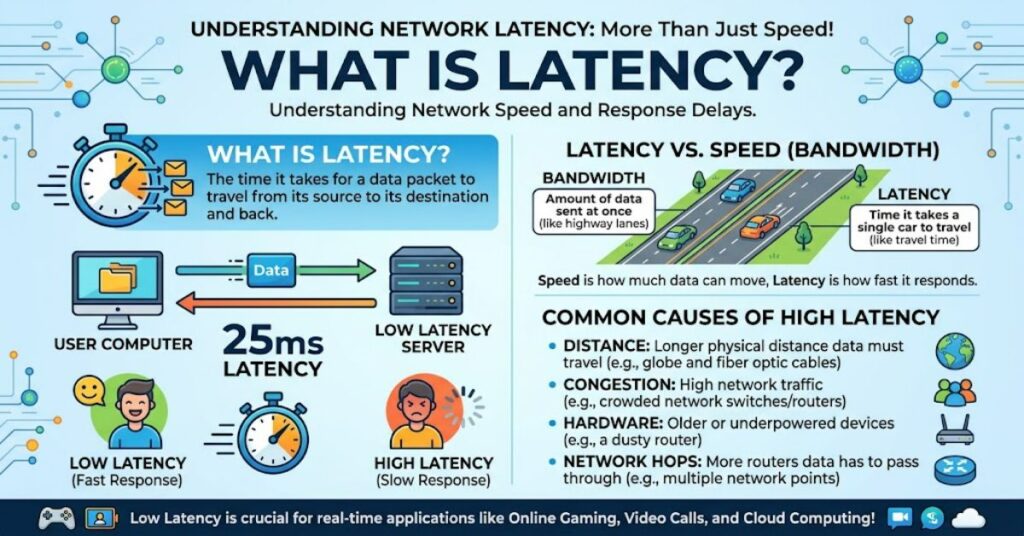
What is latency? It is the time delay between a user action and the response from a system, network, or application. Usually measured in milliseconds (ms), latency helps explain why a website takes time to load, a video call feels delayed, or an online game responds slowly to a player’s commands.
Latency is closely related to internet performance, but it is not the same as bandwidth. Bandwidth describes how much data a connection can transfer over a period, while latency measures how long a response takes to arrive. A connection can offer high bandwidth and still feel slow when its latency is high.
This distinction matters in everyday digital activities. When browsing a website, users may notice delays before pages begin to respond. During video conferences, high latency can make conversations awkward because participants hear one another late. In online gaming, even a brief delay can affect competitive play. Businesses also depend on responsive systems for cloud applications, payment processing, remote collaboration, and real-time data exchange.
Understanding latency makes it easier to identify performance problems and choose suitable solutions. Sometimes the cause is a congested Wi-Fi network. In other cases, the delay comes from a distant server, inefficient application code, or an overloaded service.
The most effective approach is to measure the delay, identify where it occurs, and address the underlying cause. This guide explains the main types of latency, how they are measured, what affects them, and which improvements are likely to make a meaningful difference.
How Latency Works
When a device sends a request to another device or server, the request travels through a series of network connections. Routers, switches, wireless access points, and servers may all contribute to the time required to receive a response.
For example, opening a website might involve a browser contacting a domain name system (DNS) resolver, establishing a secure connection, requesting page content, and waiting for the server to respond. Each stage can introduce delay.
Network latency is often discussed using round-trip time (RTT), which measures how long a packet takes to travel to a destination and for a response to return. A one-way delay measures the time taken in a single direction. These measurements are related, but they are not interchangeable.
Latency can arise from several sources:
- Propagation delay: The time required for a signal to travel through a physical medium.
- Transmission delay: The time needed to place data onto a connection.
- Processing delay: The time routers, servers, or applications spend handling data.
- Queuing delay: The time data waits in a buffer before transmission or processing.
These delays can combine. A long route with several congested network points may produce a slower response than a shorter, less congested route.
What Causes High Latency?
Several factors can make a connection slower, even when the advertised internet speed is high.
- Physical distance: Requests travelling between distant regions generally take longer than requests handled nearby.
- Network congestion: Heavy traffic can create queues that delay packets.
- Wi-Fi interference: Walls, neighbouring wireless networks, and weak signals can make local connections less reliable.
- Server overload: A busy application server may take longer to process requests.
- Inefficient software: Repeated API calls, slow database queries, and unnecessary connection setup can increase application response times.
One important distinction is that latency can originate outside the internet connection itself. If a website has slow database queries, upgrading the user’s broadband will not necessarily fix the delay.
Latency vs Bandwidth vs Jitter
| Metric | What it measures | Why it matters |
| Latency | Time taken for data to travel | Affects responsiveness |
| Bandwidth | Maximum data transfer capacity | Affects potential transfer volume |
| Throughput | Actual data transferred over time | Shows practical transfer performance |
| Jitter | Variation in packet arrival delay | Affects calls, gaming, and live audio |
For example, a high-bandwidth connection may download large files quickly but still feel unresponsive when latency is high. Likewise, low average latency does not guarantee a smooth video call if jitter causes audio packets to arrive inconsistently.
How to Measure Latency
Basic diagnostic tools can help identify delays. A ping test estimates round-trip time to a destination, while traceroute on macOS or Linux, or tracert on Windows, helps show the route packets take.
For a useful comparison, run several tests at different times, test both Wi-Fi and Ethernet where possible, and compare nearby and distant destinations. A single reading is not enough to establish a persistent problem.
Microsoft’s Azure network documentation also reports latency between cloud regions using median measurements, demonstrating why typical performance and the direction of a network route matter when choosing infrastructure (Microsoft, 2026).
Practical Ways to Reduce Latency
- Use Ethernet instead of Wi-Fi when possible, particularly for gaming or important video calls.
- Move closer to the router and reduce wireless interference.
- Pause large uploads or downloads if they cause congestion.
- Choose a cloud server region closer to the main users.
- Use a content delivery network (CDN) to serve cached content closer to visitors.
- Optimise application code, database queries, and repeated network requests.
A CDN can reduce the distance static content travels, but it cannot eliminate delays for every request. Personalised data may still need to reach the origin server. This is why infrastructure improvements should match the specific bottleneck rather than rely on one universal fix (Amazon Web Services, 2024; Cloudflare, n.d.).
The Future of Latency in 2027
By 2027, edge computing, regional cloud infrastructure, and improved network monitoring are likely to remain important ways to reduce response delays. However, the gains will depend on where users live, where applications run, and whether workloads can be processed closer to users.
The practical challenge will be balancing speed against cost, security, and system complexity. Deploying services across multiple regions can reduce some delays, but it also introduces operational overhead and data-management considerations. Improvements should therefore be measured against actual application requirements rather than assumed from new technology alone.
Key Takeaways
- Measure round-trip time over multiple tests instead of relying on one result.
- Check local Wi-Fi and congestion before paying for a faster internet package.
- Evaluate server processing time separately from network delay.
- Consider jitter and packet loss when diagnosing real-time communication problems.
- Use nearby servers and caching when they fit the application’s workload.
- Compare typical and worst-case performance when responsiveness is critical.
Conclusion
Latency is a key part of digital performance because it determines how quickly systems respond to requests. It affects everyday browsing, online games, video calls, cloud services, and business applications. Yet a low latency figure alone does not guarantee a good experience: bandwidth, throughput, jitter, packet loss, and application design also matter.
The best way to improve responsiveness is to identify where delays occur. Users can start with simple network tests and compare wired and wireless connections. Developers and businesses may need to examine server locations, database processing, routing, and caching strategies.
As digital services become more interactive, understanding response time will remain important. The most effective solution is not always a faster connection or a more expensive infrastructure package. It is the one that addresses the actual source of delay while maintaining reliability, security, and reasonable cost.
Frequently Asked Questions
What is latency in simple terms?
Latency is the time between sending a request and receiving a response. It is commonly measured in milliseconds.
What is a good latency for gaming?
Below 20 ms is generally excellent for responsive online gaming. Between 20 and 50 ms is often good, although the ideal level depends on the game and server.
Does higher internet speed reduce latency?
Not necessarily. Higher bandwidth improves data transfer capacity, but latency also depends on distance, congestion, routing, and server performance.
How can I check my internet latency?
Use a ping test or an online network speed test. Repeat measurements at different times to understand typical performance.
Can a VPN increase latency?
Yes. A VPN may add routing distance and encryption overhead. However, some VPN routes can improve performance if they avoid inefficient network paths.
Methodology
This article draws on technical explanations and documentation from Cloudflare, Microsoft Azure, and Amazon Web Services. These sources explain network delay, round-trip time, infrastructure choices, and performance optimisation. No independent network tests or firsthand experiments were conducted for this article. Numerical latency examples are illustrative rather than universal performance benchmarks. Actual results vary by location, network conditions, application architecture, and measurement method. References should be checked against their original publications before publication.
Editorial disclosure: This article was drafted with AI assistance and requires human editorial review and verification before publication.
References
Amazon Web Services. (2024). Networking and content delivery. AWS Well-Architected Framework.
Cloudflare. (n.d.). What is latency? How to fix latency. Cloudflare Learning Center.
Microsoft. (2026). Azure network round-trip latency statistics. Microsoft Learn.