
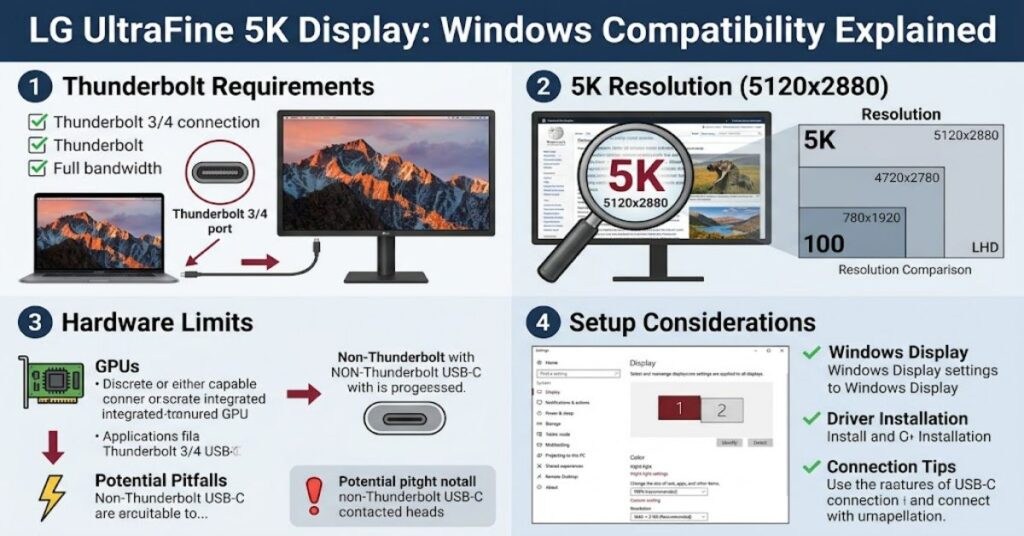
The LG UltraFine 5K is an unusual monitor for Windows users. Although the 27-inch display can be connected to a compatible Windows PC, it was designed primarily around Apple’s ecosystem. That makes the question of LG 5K display Windows compatibility more complicated than simply plugging a USB-C monitor into a laptop.
The 27MD5KL-B uses a 5120 × 2880 IPS panel, supports up to 60Hz and provides DCI-P3 99% colour coverage. Its main connection is Thunderbolt 3, while three downstream USB-C ports provide additional connectivity. LG also specifies up to 94W of power delivery.
For Windows users, the critical issue is therefore not only the operating system. The PC must have suitable Thunderbolt hardware and graphics support capable of driving a 5K signal. LG’s own documentation emphasises Thunderbolt 3 compatibility and originally positioned the display around Macs.
That makes the monitor potentially attractive for specialised Windows workstations, but less straightforward as a general-purpose Windows display.
What Makes the UltraFine 5K Different?
The UltraFine 5K was introduced as a high-resolution display closely integrated with Apple’s hardware and software environment. Its technical specifications remain impressive.
| Feature | LG UltraFine 5K 27MD5KL-B |
| Screen size | 27 inches |
| Resolution | 5120 × 2880 |
| Panel | IPS |
| Refresh rate | Up to 60Hz |
| Colour gamut | DCI-P3 99% |
| Brightness | 500 nits |
| Main connection | Thunderbolt 3 |
| Power delivery | Up to 94W |
| USB ports | 3 × USB-C |
| Camera | Built in |
| Speakers | Built in |
The 5K resolution is particularly useful for detailed photo editing, video production, design and high-density desktop work. At 27 inches, it provides approximately 218 pixels per inch, producing a very sharp image.
The problem for Windows users is that these strengths come with a specialised connection architecture rather than the broad HDMI/DisplayPort connectivity found on many conventional PC monitors.
Can You Use the LG UltraFine 5K on Windows?
Yes, but compatibility depends on the PC.
A Windows computer needs appropriate Thunderbolt connectivity rather than merely having a USB-C-shaped port. USB-C describes the physical connector, while Thunderbolt is a different connectivity standard with substantially greater bandwidth.
The distinction matters because the monitor’s maximum 5120 × 2880 at 60Hz output is delivered through Thunderbolt. LG lists Thunderbolt as the display’s primary interface and specifies 5K at 60Hz through that connection.
| Windows PC characteristic | Practical importance |
| Thunderbolt 3/compatible implementation | Essential consideration |
| Suitable graphics capability | Important for 5K output |
| Correct drivers | Important for stable operation |
| USB-C alone | Not automatically sufficient |
| HDMI-only graphics output | Not suitable for native 5K through the monitor |
| Thunderbolt bandwidth | Critical for maximum resolution |
This is one of the most important distinctions when buying a used UltraFine 5K for a Windows workstation: a USB-C port does not automatically mean Windows compatibility at 5K.
The Hardware Bottleneck
The strongest practical limitation is hardware selection.
A Windows desktop or laptop may have USB-C connectivity without having the Thunderbolt implementation required by the monitor. Even where Thunderbolt exists, the system’s graphics architecture and driver support can determine what resolution and refresh rate are actually available.
This creates a compatibility chain:
Windows PC → Thunderbolt controller → graphics hardware → driver support → LG UltraFine 5K
A failure at any stage can prevent the expected display configuration.
This is more important than the Windows version itself. Buyers should therefore identify the exact PC model and port specification before purchasing the monitor rather than assuming that a USB-C connector will work.
Windows Versus Mac Experience
| Area | Windows | Mac |
| Connection | Hardware-dependent | Designed around Thunderbolt/USB-C Macs |
| 5K output | Depends on compatible hardware | Native supported configurations |
| Display integration | More variable | More tightly integrated |
| Brightness controls | Potentially less convenient | System-integrated control |
| Built-in features | May depend on drivers | Better ecosystem integration |
| Troubleshooting | More hardware variables | Simpler intended configuration |
LG’s current support documentation specifically describes the 27MD5KL-B as requiring a compatible Mac with USB-C or Thunderbolt 3 and supported macOS for its standard configuration.
That does not mean Windows use is impossible. It means the product’s official design priorities should be considered when evaluating it for a PC workstation.
The Hidden Cost of a Cheap Used Unit
A low second-hand price can make this monitor attractive, but the purchase price is only part of the calculation.
The more useful question is whether the existing Windows workstation already has the necessary Thunderbolt and graphics capabilities. If it does not, additional hardware may be required, and adapters are not guaranteed to reproduce the monitor’s native 5K experience.
There is also a usability consideration. The UltraFine design relies heavily on host-device integration, so Windows users should not approach it like a conventional monitor with extensive physical controls and multiple video inputs.
That difference can matter more in everyday use than the impressive resolution.
Three Practical Insights for Buyers
1. Check the exact port, not the connector shape.
A USB-C port can support different standards. Confirm Thunderbolt capability on the specific Windows computer.
2. Treat 5K as a complete hardware-chain requirement.
The monitor, Thunderbolt implementation, graphics system and drivers must work together. A compatible cable alone cannot solve an incompatible host.
3. Evaluate the ecosystem, not just the panel.
The 5120 × 2880 IPS panel is the headline specification, but Windows buyers also need to consider controls, connectivity and feature integration.
The Future of LG 5K Display Windows in 2027
By 2027, the relevance of this particular monitor for Windows users is likely to depend less on the panel’s image quality and more on its age and connectivity.
The 27MD5KL-B dates from 2019, yet its 5K resolution, 60Hz refresh rate and wide-gamut IPS panel remain useful for productivity and creative work.
However, newer monitors increasingly offer multiple connectivity standards, higher refresh rates and broader compatibility. That creates a practical trade-off: the UltraFine 5K can remain attractive when its distinctive 5K image quality is the priority, but newer Windows-oriented displays may offer simpler hardware integration.
Key Insights
- Native 5K requires more than a generic USB-C connection.
- Thunderbolt compatibility is central to the Windows setup.
- The 27-inch IPS panel remains highly detailed for professional work.
- DCI-P3 99% coverage makes the display relevant to colour-sensitive workflows.
- The Mac-focused design creates usability differences on Windows.
- A used purchase should begin with checking the host PC, not the monitor alone.
Conclusion
The LG UltraFine 5K remains an interesting option for Windows users who want a dense, high-resolution 27-inch display. Its 5120 × 2880 IPS panel, 60Hz refresh rate, DCI-P3 coverage and Thunderbolt connectivity give it strong technical credentials.
The important qualification is compatibility. This is not a conventional monitor that can be evaluated only by checking whether a computer has USB-C. Windows users need suitable Thunderbolt hardware, graphics capability and driver support to make the most of the display.
Its Mac-oriented design is another factor. The monitor makes the most sense when its excellent panel and 5K resolution justify working around those limitations. For buyers considering a used unit, confirming the exact Windows computer and its Thunderbolt implementation should come before committing to the monitor.
FAQ
Can the LG UltraFine 5K work with Windows?
Yes, compatible Windows systems can use the display, but the computer’s Thunderbolt and graphics hardware must support the required display connection.
Does the LG UltraFine 5K need Thunderbolt?
The 27MD5KL-B is designed around Thunderbolt 3 and supports its maximum 5120 × 2880 resolution at 60Hz through that interface.
Will any USB-C Windows laptop work?
No. USB-C is the connector type, not a guarantee of Thunderbolt support or the bandwidth required for native 5K output.
Is the LG UltraFine 5K good for Windows photo editing?
Its 5K IPS panel and DCI-P3 99% colour gamut make it technically well suited to detailed creative work, provided the Windows system can drive it correctly.
Can Windows use the monitor’s USB ports?
The monitor includes three USB-C downstream ports, but their practical functionality depends on the host connection and system compatibility.
Methodology
This article LG 5K display Windows was prepared using LG’s published specifications and support documentation for the 27MD5KL-B, including resolution, refresh rate, connectivity, colour coverage and power-delivery information. No independent hands-on Windows benchmark or physical product test was conducted, so no personal testing results are presented as firsthand evidence.
The principal limitation is that Windows compatibility can vary according to the exact computer, Thunderbolt implementation, graphics hardware and drivers. LG’s documentation primarily describes the display within Apple’s intended ecosystem, so Windows use should be evaluated on a system-by-system basis.
AI Editorial Disclosure: This article was drafted with AI assistance. Product specifications and compatibility claims should be independently checked by the Postcard.fm editorial team before publication.
References
LG Electronics. (2026). 27″ UltraFine 5K Monitor: 27MD5KL-B specifications. LG Electronics.
LG Electronics. (2024). LG Monitor: Connecting to a Mac. LG Support.
LG Electronics. (2026). 27″ UltraFine 5K Monitor: 27MD5KL-B. LG Electronics.