
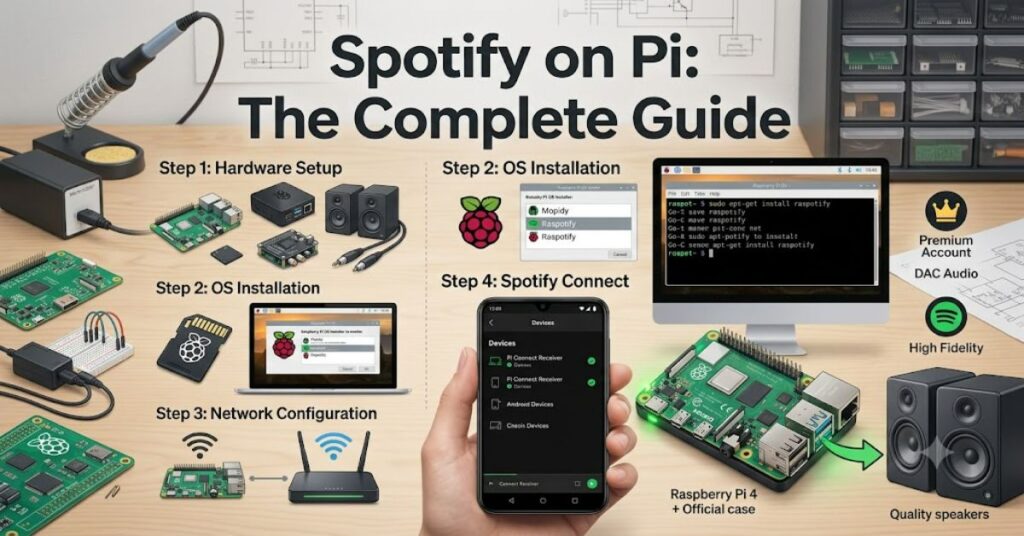
Setting up spotify on pi is one of the most popular Raspberry Pi projects for music lovers. Although Spotify’s official desktop application isn’t available for Raspberry Pi’s ARM architecture, you can still enjoy high-quality streaming by turning the device into a Spotify Connect receiver. The most common solution is Raspotify, an open-source client built on librespot, which appears as a playback device inside the Spotify app on your phone, tablet, or computer.
This approach offers a lightweight, reliable alternative to running a full desktop environment. Once configured, playback is controlled entirely from the official Spotify app while the Raspberry Pi handles audio output to speakers, amplifiers, or external DACs. The result is a dedicated streaming device that consumes very little power yet delivers excellent sound quality.
Why the Official Spotify App Doesn’t Work
The official Spotify desktop application targets x86 and x64 processors found in most Windows, macOS, and standard Linux computers.
Most Raspberry Pi models use ARM processors, which require software compiled specifically for that architecture. Because Spotify has never released an official ARM desktop client for Linux, installing the standard application directly is not possible.
Fortunately, Spotify Connect solves this limitation by separating playback from control.
How Spotify Connect Works
Spotify Connect allows another device to perform audio playback while your phone or computer acts as the remote control.
When using Raspotify:
- Your Raspberry Pi appears as an available playback device.
- Music streams directly from Spotify’s servers.
- Your phone does not continuously transmit audio.
- Playback continues even if your phone leaves the room.
This architecture reduces battery usage and improves playback stability compared to Bluetooth streaming.
Available Options
| Method | Recommended | Pros | Cons |
| Raspotify | Yes | Lightweight, reliable, easy setup | Spotify Premium required |
| Full Chromium Browser | Limited | Supports Spotify Web Player | Higher CPU and RAM usage |
| Kodi Spotify Add-on | Sometimes | Good for media centers | More complex setup |
| Android on Raspberry Pi | Experimental | Native mobile app | Performance varies |
For most users, Raspotify remains the preferred solution because it requires minimal system resources.
Hardware Requirements
| Component | Purpose |
| Raspberry Pi 3, 4, or 5 | Streaming device |
| microSD Card (16GB+) | Operating system |
| Raspberry Pi OS Lite | Lightweight Linux distribution |
| Internet connection | Spotify streaming |
| USB DAC or HAT DAC (optional) | Improved audio quality |
| Active speakers or amplifier | Audio output |
Using Raspberry Pi OS Lite reduces background processes and leaves more resources available for audio playback.
Installing Raspotify
The installation process is relatively straightforward.
First, install Raspberry Pi OS and ensure the system is updated.
Next, install Raspotify using its official installation method based on librespot. After installation, configure the device name and audio output before enabling the service.
Once running, open Spotify on your phone or computer, select the Devices menu, and choose your Raspberry Pi.
Within seconds, music begins playing directly through the Pi.
Audio Quality Considerations
One overlooked advantage of using a Raspberry Pi is flexibility.
The built-in headphone output on older models is adequate for casual listening, but external USB DACs or Raspberry Pi audio HATs provide noticeably cleaner sound.
A dedicated DAC offers:
- Lower electrical noise
- Better dynamic range
- Cleaner bass response
- Higher-quality digital-to-analog conversion
For users connecting the Pi to hi-fi systems, this upgrade often produces the biggest improvement.
Advantages of Using Raspberry Pi
Running Spotify through a Raspberry Pi offers several benefits:
- Low power consumption
- Silent operation
- Remote control through official Spotify apps
- Affordable hardware
- Easy integration with home audio systems
- Continuous software updates from the open-source community
Many enthusiasts also combine Raspotify with network storage, media servers, or smart home automation.
Limitations and Trade-Offs
No solution is perfect.
Spotify Connect requires a Spotify Premium subscription, making it unavailable for free accounts.
Because playback depends on internet connectivity, offline downloads available in the official desktop application cannot be stored on Raspberry Pi using Raspotify.
Another consideration is software maintenance. Community-developed projects occasionally require updates after Spotify changes its backend services.
Practical Insights
Three practical observations are often overlooked:
- Ethernet provides the most reliable playback. While Wi-Fi works well, wired networking minimizes interruptions in busy home networks.
- Passive cooling is usually sufficient. Audio streaming places little demand on the processor, so expensive cooling systems are rarely necessary.
- Storage speed has little impact. Once the operating system has booted, Spotify Connect streams music from the internet rather than the SD card.
These factors make even older Raspberry Pi models suitable dedicated music streamers.
The Future of Spotify on Pi in 2027
Open-source Spotify clients continue to mature alongside Raspberry Pi hardware.
By 2027, Raspberry Pi 5 and future ARM-based boards are expected to provide improved networking, storage performance, and audio support. Community projects built around librespot are likely to remain the preferred solution unless Spotify releases an official Linux ARM client.
Increasing adoption of networked home audio and open-source media platforms should also encourage continued development of lightweight streaming software.
Key Takeaways
- Raspberry Pi cannot run Spotify’s official Linux desktop application.
- Spotify Connect offers the best alternative.
- Raspotify is lightweight, reliable, and easy to configure.
- External DACs significantly improve sound quality.
- Ethernet connections provide the most consistent streaming experience.
- Raspberry Pi remains one of the most affordable dedicated music streamers available.
Conclusion
Using Spotify on a Raspberry Pi is less about replacing a desktop computer and more about building a dedicated streaming device. Thanks to Spotify Connect and open-source software such as Raspotify, a small single-board computer can deliver reliable music playback while being controlled entirely from the official Spotify application.
For casual listeners, the setup offers simplicity and low power consumption. Audio enthusiasts can enhance the experience further with quality DACs and amplifiers. Although the lack of an official ARM desktop client limits certain features, the available alternatives are mature enough that most users will not notice the difference in daily use. As Raspberry Pi hardware and community software continue to evolve, this remains one of the platform’s most practical and rewarding projects.
Frequently Asked Questions
Can I install the official Spotify desktop app on Raspberry Pi?
No. The official Linux desktop application is designed for x86/x64 processors and does not support Raspberry Pi’s ARM architecture.
What is the best way to use Spotify on a Raspberry Pi?
Raspotify is the most widely recommended option because it enables Spotify Connect with minimal resource usage.
Do I need Spotify Premium?
Yes. Spotify Connect requires an active Spotify Premium subscription.
Does Raspotify support high-quality audio?
Yes. Audio quality depends largely on your DAC, speakers, and Spotify streaming quality settings.
Can I use Bluetooth speakers?
Yes. Bluetooth speakers can work, although USB DACs or wired speakers generally provide lower latency and better audio quality.
Methodology
This guide is based on official Raspberry Pi documentation, Spotify Connect documentation, the Raspotify project, and librespot documentation. Technical compatibility details were verified against current ARM Linux support and Raspberry Pi software recommendations. Practical considerations reflect established best practices documented by the Raspberry Pi and open-source communities.
References
- Raspberry Pi Ltd. (2024). Raspberry Pi Documentation. https://www.raspberrypi.com/documentation/
- Spotify. (2024). Spotify Connect. https://support.spotify.com/
- dtcooper. (2024). Raspotify. https://github.com/dtcooper/raspotify
- librespot Project. (2024). librespot Documentation. https://github.com/librespot-org/librespot