
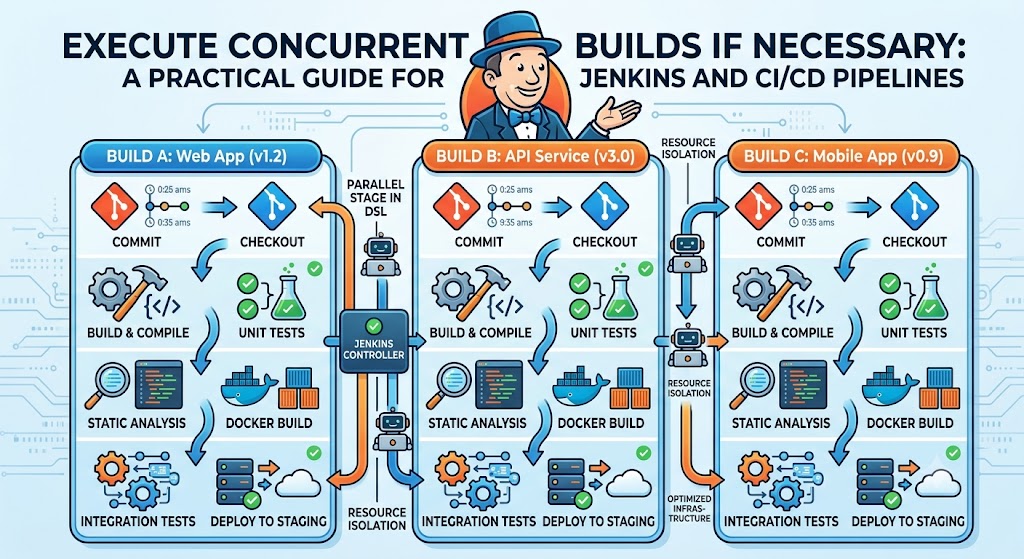
Modern software teams depend on Continuous Integration and Continuous Delivery (CI/CD) pipelines to deliver features quickly and reliably. One common bottleneck occurs when builds are queued because another instance of the same project is already running. To solve this problem, many development teams choose to execute concurrent builds if necessary.
Instead of forcing developers to wait for earlier builds to finish, concurrent execution allows multiple build jobs to run at the same time. This significantly reduces pipeline delays and improves productivity, especially in large teams where code changes happen frequently.
However, enabling concurrent builds is not always the right choice. Shared resources, deployment environments, and testing infrastructure must be considered carefully before allowing multiple executions.
What Does Execute Concurrent Builds Mean?
Concurrent builds refer to running multiple instances of the same pipeline or job simultaneously instead of placing new jobs into a queue.
For example:
- Developer A pushes new code.
- Developer B pushes another commit a minute later.
- Instead of waiting, both builds start immediately if sufficient resources are available.
This approach keeps development moving and provides faster feedback to every contributor.
Why Teams Enable Concurrent Builds
Several situations make concurrent builds highly beneficial.
Faster Feedback
Developers receive build and test results sooner instead of waiting for earlier jobs.
Reduced Queue Times
Busy repositories often generate dozens of commits every hour. Concurrent execution prevents long build queues.
Better Resource Utilization
Organizations with multiple build agents can use available hardware more efficiently rather than leaving machines idle.
Improved Team Productivity
Parallel execution allows multiple developers to validate changes without blocking one another.
When Concurrent Builds Should Be Used
Concurrent execution works best when build jobs are independent.
Typical examples include:
| Scenario | Recommended |
| Compiling applications | Yes |
| Running automated tests | Yes |
| Static code analysis | Yes |
| Docker image builds | Usually |
| Production deployments | Usually No |
| Database migrations | No |
Tasks that modify shared resources should usually remain sequential.
How Jenkins Supports Concurrent Builds
Jenkins offers built-in support for concurrent builds.
In Freestyle Projects, administrators can simply enable the option:
“Execute concurrent builds if necessary.”
Once enabled, Jenkins no longer queues identical jobs if additional executors are available.
For Jenkins Pipeline projects, concurrency can also be controlled using pipeline directives and executor configuration.
A typical setup involves:
- Configuring multiple executors.
- Assigning sufficient build agents.
- Isolating workspaces when needed.
- Preventing shared resource conflicts.
Best Practices for Safe Concurrent Builds
Simply enabling concurrency is rarely enough.
Use Separate Workspaces
Each build should operate in its own workspace to avoid file conflicts.
Isolate Build Artifacts
Store generated artifacts separately rather than writing to shared folders.
Avoid Shared Temporary Files
Temporary directories should be unique for every build instance.
Lock Critical Resources
If multiple jobs require the same database or hardware device, use locking mechanisms to prevent collisions.
Monitor Agent Capacity
Running too many concurrent builds can overwhelm build servers and actually reduce performance.
Advantages and Potential Risks
| Advantages | Risks |
| Faster pipelines | Higher CPU usage |
| Shorter developer wait times | Workspace conflicts |
| Better hardware utilization | Memory exhaustion |
| Faster testing | Race conditions |
| Increased productivity | Deployment issues |
The goal is to balance performance with stability.
Real-World Example
Imagine a software company with 25 developers contributing to the same application.
Without concurrent builds:
- Every commit waits in line.
- Developers wait 20–40 minutes for results.
- Merge requests remain open longer.
With concurrent builds enabled:
- Four build agents process commits simultaneously.
- Feedback arrives within a few minutes.
- Developers fix issues immediately.
- Overall release speed improves significantly.
This simple configuration change can dramatically improve engineering efficiency.
Common Challenges
Although concurrent execution offers many advantages, several issues frequently appear.
Shared Database Access
Multiple tests writing to the same database may interfere with one another.
Solution: Use isolated test databases or containerized environments.
Workspace Corruption
Two builds modifying identical files can create inconsistent results.
Solution: Use separate workspaces for every executor.
Limited Build Resources
Running too many builds simultaneously can exhaust CPU, memory, or disk space.
Solution: Scale build agents according to workload.
Deployment Conflicts
Deploying multiple versions to the same environment simultaneously can cause failures.
Solution: Keep deployment stages sequential while allowing earlier stages to run concurrently.
Comparison of Popular CI/CD Platforms
| Platform | Concurrent Builds | Notes |
| Jenkins | Yes | Executor-based configuration |
| GitHub Actions | Yes | Parallel jobs and matrix builds |
| GitLab CI/CD | Yes | Multiple runners supported |
| Azure DevOps | Yes | Parallel pipelines available |
| CircleCI | Yes | Controlled through executors |
Although configuration differs, the underlying goal remains the same: reduce waiting time while maintaining reliable builds.
Practical Tips Before Enabling Concurrent Builds
Before turning on concurrent execution, ask the following questions:
- Does the build modify shared files?
- Are test environments isolated?
- Is sufficient hardware available?
- Are deployments separated from build stages?
- Can logs be generated independently?
Answering these questions helps prevent unexpected failures after enabling concurrency.
The Future of Concurrent Builds in 2027
By 2027, CI/CD platforms are expected to become even more intelligent. Instead of simply executing jobs in parallel, build systems will increasingly use AI-assisted scheduling to determine the most efficient way to allocate resources.
Cloud-native build agents, Kubernetes-based runners, and elastic infrastructure will allow organizations to scale automatically during peak development periods. Improved caching, container isolation, and predictive resource management will further reduce build times while minimizing infrastructure costs.
Organizations adopting these technologies will likely see faster release cycles and better developer productivity without sacrificing reliability.
Key Takeaways
- Concurrent builds reduce pipeline waiting times.
- They improve developer productivity.
- Independent jobs benefit most from parallel execution.
- Shared resources require careful isolation.
- Monitoring infrastructure is essential for stable performance.
Conclusion
Choosing to execute concurrent builds if necessary can dramatically improve the efficiency of modern CI/CD pipelines. By allowing multiple instances of a project to run simultaneously, development teams receive faster feedback, reduce build queues, and make better use of available infrastructure.
However, concurrency should never be enabled blindly. Shared databases, deployment environments, and temporary files can introduce race conditions if builds are not properly isolated. Careful planning, adequate hardware resources, and sound pipeline design are essential for success.
When implemented correctly, concurrent builds become a valuable optimization that supports faster software delivery while maintaining the reliability expected from professional CI/CD workflows.
Frequently Asked Questions
What are concurrent builds?
Concurrent builds allow multiple instances of the same job to execute simultaneously instead of waiting in a queue.
Should every Jenkins job allow concurrent builds?
No. Jobs that use shared resources or perform deployments may require sequential execution.
Do concurrent builds make pipelines faster?
Yes. They reduce waiting time by allowing several jobs to run in parallel when resources are available.
Can concurrent builds cause failures?
Yes. Improper workspace sharing, race conditions, and resource conflicts can cause build failures if pipelines are not designed correctly.
Which CI/CD platforms support concurrent builds?
Popular platforms including Jenkins, GitHub Actions, GitLab CI/CD, Azure DevOps, and CircleCI all support concurrent execution through their respective configuration options.
Methodology
This article is based on current CI/CD practices, Jenkins documentation, and commonly accepted DevOps engineering principles. Information was gathered from official platform documentation and industry best practices. Readers should verify configuration details against the documentation for their specific CI/CD platform and version before implementing concurrent builds.