
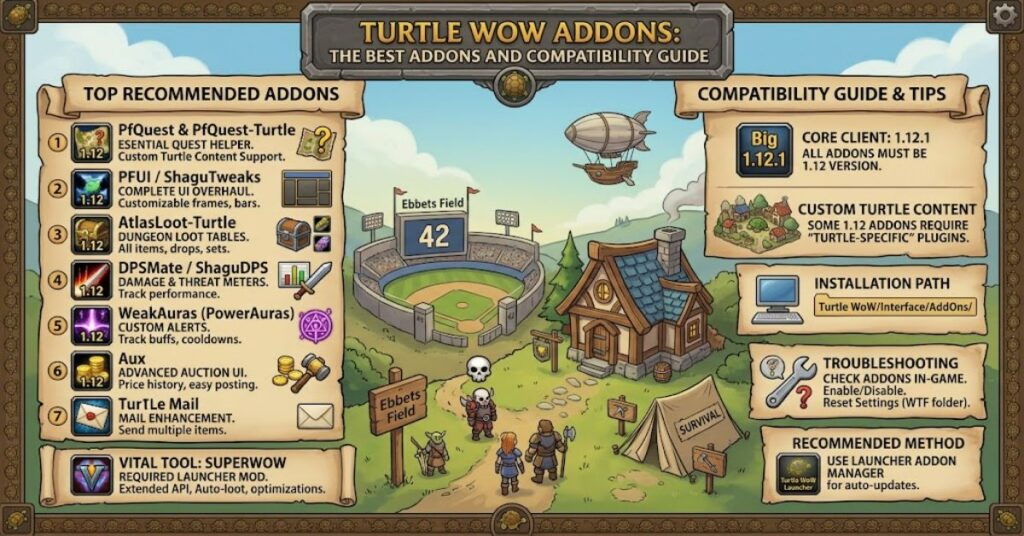
Finding reliable turtle wow addons is less straightforward than downloading popular World of Warcraft mods from a current addon catalogue. Turtle WoW builds on the Vanilla 1.12 client base, while also adding custom quests, zones, mechanics and other server-specific content. That combination means an addon designed for modern World of Warcraft may not work at all, while a standard Vanilla addon may function only partially unless a compatible fork has been adapted for the server.
For players, the practical question is therefore not simply which addons are “best”. It is which tools match the 1.12 interface architecture and remain useful alongside Turtle WoW’s custom additions. Interface customisation, inventory management, quest tracking and combat feedback can all improve the playing experience, but each category has its own compatibility risks.
The most dependable approach is to begin with the addon’s intended client version, then check whether a Turtle WoW-specific version or community-maintained fork exists. This matters especially for quest and database-driven tools. An addon can load successfully yet still lack information about custom quests or locations.
That distinction is important. Installation success does not automatically mean full feature compatibility. The sections below explain how to evaluate the major categories, compare common addon functions and avoid the problems created by mixing modern, Classic-era and Vanilla-era files.
Why Turtle WoW Uses a Different Addon Compatibility Model
The key technical issue is the client generation. Turtle WoW’s addon environment is rooted in the older 1.12 API and interface structure. Modern addons are built for substantially different versions of World of Warcraft and may depend on functions, libraries or interface systems that did not exist in Vanilla.
A useful way to think about compatibility is through three layers:
| Addon Type | Expected Compatibility | Main Consideration |
| Vanilla 1.12 addon | Often suitable | May not recognise custom Turtle WoW content |
| Turtle WoW-specific fork | Usually the best option | Depends on ongoing maintenance |
| Modern Retail addon | Generally incompatible | Uses a different API and client architecture |
| Modern WoW Classic addon | Usually incompatible without a port | Similar appearance does not mean API compatibility |
The important insight is that version labels matter more than an addon’s current popularity. A highly regarded Retail interface mod may be completely unusable on a 1.12 client, while an older project can remain valuable because it was designed for the same technical environment.
The Best Categories of Turtle WoW Addons
Interface and Action Bar Addons
Interface tools are among the most useful additions because they can improve screen organisation without changing core gameplay. Action bar management, unit frames and minimap adjustments can help players create a cleaner layout.
These addons are usually less dependent on server-specific databases than questing tools. As a result, a compatible Vanilla version may continue working even when the server introduces custom content.
The main risk is interface conflicts. Two addons attempting to modify the same frames can produce overlapping buttons, broken menus or error messages.
Inventory and Item Management
Bag organisation becomes increasingly valuable as a character collects crafting materials, equipment, quest items and consumables.
Inventory addons can provide:
- Unified bag views
- Item search functions
- Sorting tools
- Improved categorisation
- Bank organisation
For this category, a Vanilla-compatible version is generally more important than whether the addon understands Turtle WoW-specific quests. Item databases may still require updates if the server contains custom objects.
Quest and Map Tools
Quest addons can offer substantial quality-of-life improvements, but they also present the clearest compatibility challenge.
A standard Vanilla database may know the original quests, NPCs and locations while lacking Turtle WoW’s custom additions. This creates an important limitation: the addon may appear to work perfectly for established Vanilla content while becoming incomplete when players enter custom quest lines or areas.
For that reason, a Turtle WoW-specific database or fork is preferable where available.
Combat and Information Addons
Combat utilities can provide timers, cooldown information, damage data or other feedback. Their usefulness depends on the player’s class and preferred interface style.
However, players should avoid assuming that more information always produces a better experience. An overloaded interface can make important signals harder to see.
Comparison Table: Choosing the Right Addon Type
| Addon Category | Main Benefit | Compatibility Risk | Best Use |
| Interface customisation | Cleaner layout and better control | Conflicts with other UI mods | Players improving screen organisation |
| Inventory management | Faster item handling | Custom item data may be incomplete | Gathering, crafting and banking |
| Quest helpers | Better navigation and quest information | Custom content may be missing | Leveling and exploration |
| Map tools | Improved location awareness | Database coverage can vary | Players navigating large areas |
| Combat information | More visible timers and feedback | API or UI conflicts | Raiding, dungeons and class optimisation |
How to Install Addons Safely
The basic installation process follows the traditional Vanilla addon structure. The addon folder must be placed in the correct Interface/AddOns directory for the client being used.
Before launching the game, check the folder structure. One common mistake is extracting an archive that creates an unnecessary extra folder level. If the game expects an addon folder containing its files directly, but instead finds a folder containing another folder, the addon may not appear in the character selection addon list.
A simple workflow is:
- Confirm that the addon supports the 1.12 client environment.
- Check whether a Turtle WoW-specific fork or version is available.
- Extract the addon into the appropriate AddOns directory.
- Verify that the folder structure is not duplicated.
- Launch the client and check the addon list.
- Test the addon in a low-risk environment before relying on it during group content.
This process reduces one of the most common sources of confusion: assuming an addon is broken when the actual problem is an incorrect folder structure.
Practical Risks and Trade-Offs
The biggest trade-off with turtle wow addons is between functionality and reliability. A heavily modified interface can provide convenience, but every additional addon increases the number of possible interactions.
There are three recurring risks.
First, outdated addons can conflict with other modifications or generate errors after changes to the client environment.
Second, database-dependent tools may provide incomplete information about custom content. This is especially relevant to quest helpers.
Third, downloading files from unofficial mirrors can introduce uncertainty about what has been modified. Players should prefer recognised project sources and established community repositories where possible.
The most effective setup is usually selective rather than excessive. Start with one addon for each genuine need and add further tools only after confirming that the existing interface remains stable.
Three Important Insights Beyond the Basic Addon List
An Addon Can Be Technically Compatible but Functionally Incomplete
This is the most important distinction for Turtle WoW players. A Vanilla addon may load correctly because its code works with the 1.12 API. That does not guarantee its data recognises custom quests, NPCs, zones or items.
Database Maintenance Matters More for Quest Tools Than Interface Tools
An action bar addon mainly interacts with the client interface. A quest database depends on accurate information about the game world. As Turtle WoW expands custom content, database coverage becomes a more significant maintenance issue.
Smaller Addon Setups Can Be Easier to Troubleshoot
When an interface breaks, diagnosing ten or twenty installed addons is more difficult than testing a small, purpose-driven collection. A minimal setup also makes it easier to identify which modification causes an error.
These points are practical rather than cosmetic. They explain why the “best” collection is not necessarily the longest list of available mods.
The Future of Turtle WoW Addons in 2027
The future of the Turtle WoW addon ecosystem will depend heavily on continued community maintenance. Because the project operates around an older client architecture, addon development is less likely to follow the same path as Retail World of Warcraft.
The more significant trend is likely to be specialised compatibility work. As custom content grows, players will have greater reason to seek forks that account for Turtle WoW-specific quests, locations and gameplay systems.
There is also a preservation issue. Older Vanilla addons can disappear from their original hosting locations, leaving players dependent on archives and community-maintained repositories. That makes documentation and transparent version history increasingly important.
The likely direction is not unlimited modernisation. The technical constraints of the 1.12 client remain central. The strongest addon projects will probably be those that respect those constraints while updating their data and compatibility for the server’s evolving content.
Key Takeaways
- Turtle WoW addon compatibility begins with the Vanilla 1.12 client environment.
- A Turtle WoW-specific fork is often preferable when custom content support is required.
- Quest and database addons face greater compatibility challenges than simple interface modifications.
- Successful installation does not guarantee complete support for custom quests or locations.
- A smaller, well-tested addon collection is easier to maintain and troubleshoot.
- Version compatibility should be checked before downloading any mod built for Retail or modern Classic clients.
Conclusion
Choosing the right turtle wow addons requires more attention than simply selecting the most popular World of Warcraft modifications. The server’s Vanilla 1.12 foundation creates a clear technical boundary, while its custom content introduces another layer of compatibility concerns.
The strongest setup begins with practical needs. Players who want a cleaner interface should prioritise stable Vanilla-compatible UI tools. Those who rely on quest databases or map information should look more closely at whether a fork has been updated to recognise Turtle WoW-specific content.
Compatibility is also not a single yes-or-no question. An addon can load successfully, function correctly and still provide incomplete information in custom areas. Understanding that difference helps players build more reliable interfaces and avoid unnecessary troubleshooting.
For most users, the best approach is deliberate selection: verify the client version, favour maintained forks where custom content matters, and add tools gradually rather than transforming the entire interface at once.
FAQ
What are the best Turtle WoW addons?
The best choices depend on what you want to improve. Interface, inventory, quest, map and combat addons each solve different problems. Prioritise versions designed for Vanilla 1.12 or a Turtle WoW-compatible fork.
Are normal Vanilla addons compatible with Turtle WoW?
Many Vanilla 1.12 addons can work because Turtle WoW uses the same general client foundation. However, addons that rely on game databases may not recognise all custom quests, NPCs or locations.
Why do some Turtle WoW addons need specific forks?
Specific forks may adapt an existing Vanilla addon to recognise custom content or work around differences introduced by the server. A standard version can be technically functional while still missing important information.
Can I use WoW Classic addons on Turtle WoW?
Generally, modern WoW Classic addons are not directly compatible with the Vanilla 1.12 environment. They may require a dedicated port or fork built for the older client.
Where should I install Turtle WoW addons?
Compatible addons should be placed in the appropriate Interface/AddOns directory within the game client installation. Check the folder structure carefully after extracting the files.
Why is my addon not appearing in the game?
Common causes include using an incompatible client version, placing the addon in the wrong directory or creating an extra folder layer during extraction. Check the folder structure and client compatibility first.
References
Turtle WoW. (n.d.). Official website and game resources. Turtle WoW.
World of Warcraft Wiki. (n.d.). Patch 1.12.1. Fandom.
CurseForge. (n.d.). World of Warcraft addon resources and project archives. Overwolf.
GitHub. (n.d.). Community-maintained World of Warcraft addon repositories. GitHub.
Methodology
This article was developed by examining the technical distinction between the Vanilla 1.12 addon environment and later World of Warcraft client generations, alongside the practical implications of Turtle WoW’s custom content. The analysis separates code-level compatibility from database-level coverage because an addon may load correctly while lacking information about server-specific quests, locations or items.
Sources and project documentation should be checked against their current versions before publication, particularly because community-maintained forks can change availability or compatibility. This article does not claim personal testing of individual addons or invent practitioner experience. It presents a compatibility framework rather than guaranteeing that every Vanilla addon will function correctly.
Editorial disclosure: This article was drafted with AI assistance and should be reviewed and verified by the Postcard.fm editor before publication. Version compatibility, references and any addon-specific claims should be independently confirmed against current official documentation and maintained project sources.