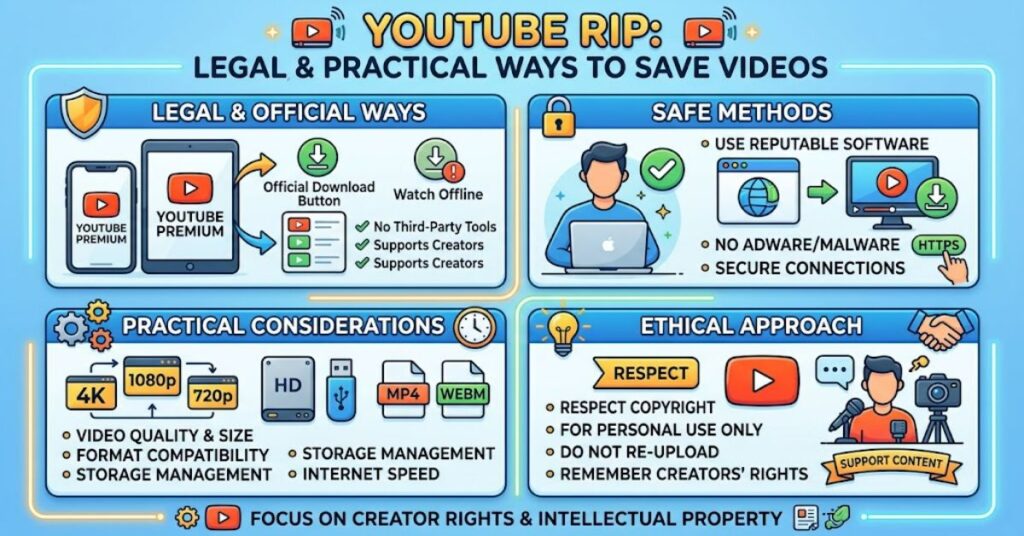
A YouTube rip generally refers to extracting a video or audio file from YouTube so it can be stored or used outside the platform. People search for ripping tools for many reasons: offline access, personal archiving, editing, research, education or recovering copies of their own uploads.
The important distinction is between accessing content offline through YouTube’s approved features and extracting a separate file with an external downloader. YouTube currently allows Premium members to download eligible videos for offline playback, while creators can download videos they have uploaded themselves. Those downloads are not the same as receiving unrestricted MP4 or MP3 files from any YouTube video.
That distinction matters because copyright ownership, licensing terms and platform rules can all apply. A video being publicly viewable does not automatically mean that its underlying audiovisual content can be copied, redistributed or converted into another format.
For readers researching a YouTube rip, the practical question is therefore not simply which converter works. It is which method fits the intended use while preserving security, copyright compliance and acceptable media quality.
What Does a YouTube Rip Actually Do?
Technically, ripping describes the process of obtaining media data from a digital source and saving it in another form. With YouTube content, that might mean extracting a video stream, combining separate audio and video streams, or converting an audiovisual source into an audio-only file.
Different tools approach the process differently. Some provide a browser interface, while others use desktop software or command-line utilities. The underlying workflow can involve downloading available media streams, processing them and producing a local file.
However, technical capability should not be confused with permission.
YouTube’s developer policies specifically state that applications using YouTube API Services must not enable users to download or store copies of YouTube audiovisual content without prior written approval. The policies also prohibit using the API to separate audio or video components from YouTube content.
This makes the distinction between a technically possible operation and an authorised operation particularly important.
Main Ways to Save YouTube Content
| Method | Typical use | Separate file produced? | Main consideration |
| YouTube Premium download | Offline viewing | No unrestricted media file | Remains within YouTube |
| Download your own upload | Creator backup | Yes | Intended for your own content |
| Purchased YouTube content | Offline viewing | Platform-managed download | Subject to purchase terms |
| Third-party converter | Format conversion | Often yes | Rights and security risks |
| Command-line downloader | Advanced media handling | Often yes | Technical and compliance considerations |
YouTube states that creators can download their own uploaded videos, including through YouTube Studio. It also states that users cannot download other users’ videos as ordinary files through this creator-download facility.
For eligible videos, YouTube Premium provides an official offline-viewing mechanism. On supported computers and mobile devices, users can select the Download option from the video page. The resulting content is designed for offline playback within YouTube rather than unrestricted redistribution.
Official Offline Downloads Versus External Ripping
The most important practical difference is control.
With an official YouTube download, YouTube manages availability, account authentication and playback conditions. Downloads can require periodic reconnection to the internet, and access can depend on the user’s Premium membership and the video’s continued availability.
An external converter aims to create a conventional media file that can potentially be opened independently. That can be useful for legitimately owned or licensed material, but it introduces additional questions.
First, does the user have permission to copy the content? Second, is the software trustworthy? Third, does the resulting file preserve the required quality and metadata? Fourth, could the service expose the user to intrusive advertising, malicious downloads or deceptive browser prompts?
These questions are often more important than whether a converter offers 1080p, 4K or MP3 output.
Quality Is More Than Resolution
A common misconception is that selecting a higher resolution automatically produces a better rip.
Video quality depends on the original source, available stream, bitrate, codec and subsequent processing. Converting a compressed source into another compressed format does not restore information that was already lost.
Audio conversion has a similar limitation. Converting an existing compressed audio stream into another lossy format can create another generation of compression without adding detail.
| Output choice | Potential benefit | Limitation |
| Original creator file | Highest control | Only available to owner or authorised users |
| Platform offline copy | Convenient playback | Restricted to supported YouTube environment |
| Direct media conversion | Portable file | Quality depends on source and conversion |
| Audio-only conversion | Smaller file and simple playback | Removes video and may introduce compression loss |
The practical insight is that source quality matters more than an attractive output number. A converter cannot manufacture original-quality information that is absent from the source.
Copyright and Permission
Copyright is one of the biggest issues surrounding YouTube ripping.
A public video may contain music, film footage, photography, spoken material, software demonstrations or other copyrighted works. The person who uploaded it may not own every element within it.
That creates several possible rights layers.
A creator may own the video recording but use licensed music. A company may publish a promotional film containing stock footage. An educator may upload material under a specific licence. A musician may release a performance while retaining restrictions on redistribution.
Consequently, “the video is on YouTube” is not a sufficient copyright test.
For personal projects, educational work or professional production, users should check the video’s licence, obtain permission where required and retain evidence of that permission when practical.
Security Risks of Free Ripping Sites
Free online converters can also create technical risks.
Some services use aggressive advertising, misleading download buttons, browser notifications or redirects. Others may ask users to install software or browser extensions that are unrelated to media conversion.
A safer workflow is to avoid unknown executable downloads, inspect file extensions carefully and never provide account credentials to a conversion site simply to process a public video.
This produces another useful distinction: a technically successful conversion can still be a security failure.
For important computers, downloading an unexpected executable because a conversion page displayed a prominent “Download” button is particularly risky. A normal media file and an executable program are not equivalent.
When Command-Line Tools Make Sense
Command-line media tools can offer greater control over formats, codecs, metadata and processing. They are commonly used by technically experienced users who need reproducible workflows.
The advantage is precision. A command-line workflow can be documented, repeated and integrated into a larger media-processing pipeline.
The disadvantage is that technical control does not solve copyright or platform-authorisation issues. A sophisticated tool can still be used for an unauthorised copy.
For that reason, command-line expertise should be paired with clear rights management.
Three Practical Insights
1. The safest workflow begins with ownership, not software.
If the content belongs to you, YouTube already provides a creator download mechanism. This can eliminate the need for an external ripping service altogether.
2. Offline viewing and file ownership are different concepts.
A Premium download is designed for offline playback inside YouTube. It should not be treated as equivalent to receiving an unrestricted MP4 or MP3 file.
3. Conversion quality cannot exceed source quality.
Changing containers, resolutions or codecs can alter compatibility, but it cannot recreate detail that was removed during the original encoding process.
The Future of YouTube Rip in 2027
The direction of YouTube’s official ecosystem points towards stronger control over offline media access rather than unrestricted extraction.
YouTube continues to develop account-based offline viewing through Premium, with downloads managed through supported applications and browsers. Downloaded content can require periodic internet reconnection, while membership status can affect continued access.
At the same time, YouTube’s developer policies explicitly restrict applications from using API services to facilitate offline downloading, audiovisual copying or audio separation.
For legitimate users, the likely practical divide will therefore remain clear: creator-owned downloads, licensed media and official offline playback on one side; unauthorised extraction and redistribution on the other.
Technical tools may continue to evolve, but copyright and platform rules will remain separate from technical capability.
Key Insights
- A YouTube rip can describe several different technical processes rather than one specific application.
- Official offline playback is different from obtaining a portable media file.
- Creator-owned videos have a direct official download pathway.
- Copyright permission should be established before copying or redistributing third-party content.
- Higher output resolution does not guarantee higher source quality.
- Unknown conversion websites can introduce security risks.
- Command-line tools offer technical control but do not create copyright permission.
Conclusion
A YouTube rip sits at the intersection of media technology, copyright and platform controls. The technical process can be straightforward, but deciding whether a particular download is appropriate requires more than knowing which tool to use.
For content you own, YouTube provides a direct creator-download mechanism. For supported offline viewing, YouTube Premium provides an official alternative that keeps playback inside the platform’s ecosystem.
Third-party converters and command-line applications may offer greater file flexibility, but they introduce additional considerations around authorisation, security, media quality and platform rules. YouTube’s API policies also explicitly prohibit applications from facilitating unauthorised audiovisual downloading or audio separation.
The most useful way to approach YouTube ripping is therefore to begin with the rights attached to the content and the purpose of the copy. Once those questions are settled, the appropriate technical method becomes much easier to identify.
FAQ
What is a YouTube rip?
A YouTube rip generally means extracting video or audio from a YouTube source and saving it as a separate media file. The technical process varies by tool.
Can I download my own YouTube videos?
Yes. YouTube provides creators with options to download videos they have uploaded, including through YouTube Studio.
Can YouTube Premium download videos?
Yes. Eligible YouTube Premium users can download supported videos for offline viewing on compatible devices and browsers.
Does a Premium download create an MP4 file?
Not in the same sense as downloading your own uploaded video. Premium downloads are managed for offline playback within YouTube and are subject to account and availability conditions.
Is ripping every YouTube video legal?
No single rule applies to every video or jurisdiction. Copyright ownership, licensing, permission and applicable law determine whether copying or redistribution is permitted.
Why can a converted video look worse than the original?
Conversion can involve additional compression or processing. A new file cannot restore information that was already lost in the original source.
Are free YouTube converters safe?
Not necessarily. Unknown services can expose users to deceptive advertising, unwanted software, redirects or unsafe downloads. Users should treat unfamiliar conversion sites cautiously.
Methodology
This article was prepared using current YouTube Help documentation and Google’s published YouTube API Developer Policies. The analysis distinguishes official YouTube functionality from external conversion methods and does not treat technical capability as evidence of permission.
Primary validation sources included YouTube Help pages covering offline downloads, creator-owned video downloads and Premium functionality, together with Google’s YouTube API Services Developer Policies. No claim of hands-on testing of a third-party ripping service is presented because no such testing was conducted for this article.
The principal limitation is jurisdictional: copyright exceptions and permitted copying can vary by country and use case. Readers should consult applicable local law for specific legal questions.
References
Google. (2026). YouTube API Services: Developer policies. Google for Developers.
YouTube. (2026). Download YouTube videos that you’ve uploaded. YouTube Help.
YouTube. (2026). Watch videos offline with YouTube Premium. YouTube Help.
YouTube. (2026). YouTube videos offline FAQs. YouTube Help.
Human Editorial Note
This article was drafted with AI assistance and should be reviewed and verified by the Postcard.fm editorial team before publication. Statistics, platform policies, legal claims and source details should be checked against the latest primary documentation.