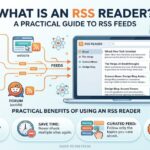
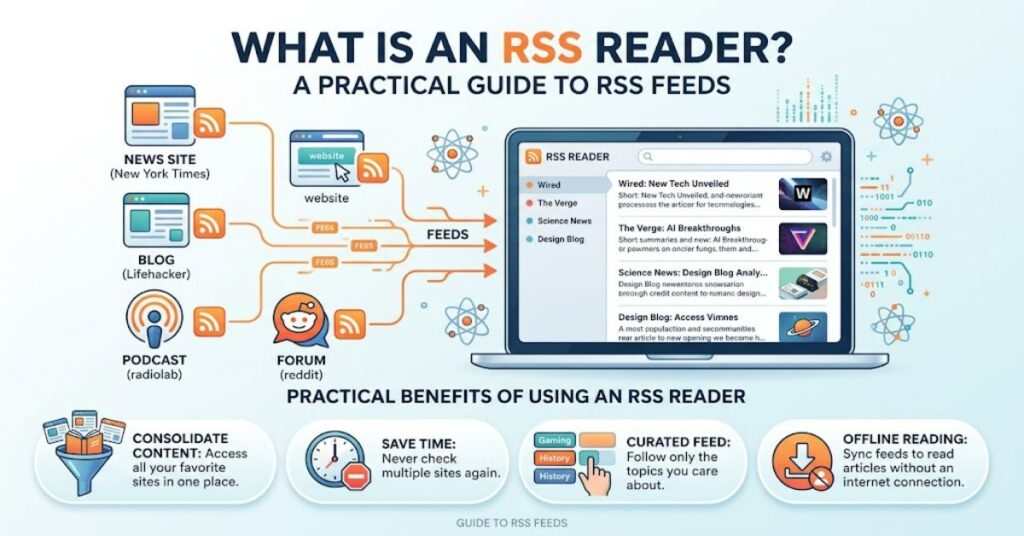
What is an RSS reader? It is a software application that collects and organises updates from multiple websites, blogs and news sources into a single, centralised dashboard. Instead of opening several websites to check whether anything new has been published, users subscribe to RSS feeds and allow the reader to bring new items together.
RSS stands for Really Simple Syndication, although the acronym has also historically been associated with terms such as RDF Site Summary and Rich Site Summary. RSS itself is a family of XML-based formats designed to distribute regularly updated web content. The RSS 2.0 specification defines elements that can describe a channel and its individual items, including titles, descriptions, publication dates and unique identifiers.
The basic idea is straightforward. A website publishes an RSS feed. The feed reader periodically retrieves that feed, identifies new items and displays them alongside updates from other sources.
This makes an RSS reader particularly useful for people who follow many websites. A researcher might monitor technology publications, government announcements and specialist blogs. A journalist could track dozens of news sources. A business professional might follow industry publications and competitors. A casual reader can use the same system simply to keep up with favourite websites.
The important distinction is that an RSS reader does not decide what is important in the same way a social-media algorithm does. The user chooses the sources. That difference makes RSS an enduring tool for controlled information consumption.
How Does an RSS Reader Work?
An RSS reader sits between publishers and readers.
The process normally follows four stages:
- A website publishes a feed.
The site generates an RSS document containing information about recent content. - The user subscribes to the feed.
The feed address is added to an RSS reader. - The reader retrieves updates.
The application checks subscribed feeds for newly published or changed items. - The reader organises the results.
New articles appear in a common interface where they can be read, sorted, saved or otherwise managed.
An RSS feed is generally an XML document rather than a conventional webpage. In RSS 2.0, a channel can contain multiple items, while an item can include fields such as title, link, description, author, category, publication date and globally unique identifier.
That structure is important because it allows software to process information consistently. A reader does not need every website to have the same visual design. It can interpret the feed’s structured data and present the content in its own interface.
The European Commission provides a useful real-world example. Its websites publish RSS feeds for areas such as news, publications and guidance, allowing subscribers to receive updates without repeatedly checking the relevant pages.
RSS Reader vs Visiting Websites
The practical advantage of an RSS reader becomes clearer when compared with traditional browsing.
| Approach | How it works | Main advantage | Main limitation |
| Direct browsing | User visits each website individually | Full website experience | Time-consuming across many sources |
| Social-media feed | Platform selects and ranks posts | Convenient discovery | Algorithm controls much of the selection |
| Email newsletter | Publisher sends selected updates | Familiar and accessible | Can increase inbox volume |
| RSS reader | Reader aggregates subscribed feeds | User-controlled central dashboard | Requires sources that provide usable feeds |
The key difference is control. With direct browsing, the user controls which sites are visited. With social platforms, the user selects accounts but the platform often determines the order and prominence of content. An RSS reader gives the user a source-first model: subscribe to the publications you want, then review their updates in one place.
That does not make RSS automatically better. It simply makes it particularly suitable for deliberate information monitoring.
What Can You Use an RSS Reader For?
RSS is most valuable when information arrives regularly and the reader wants to monitor several sources.
News Monitoring
News organisations, specialist publications and government bodies can publish feeds for new stories or announcements. A reader can place these feeds into separate folders, making it easier to distinguish general news from specialist subjects.
Research
RSS can become a lightweight research-monitoring system. A researcher following academic blogs, institutional announcements, technology publications and specialist commentary can check one dashboard rather than maintaining a long list of browser bookmarks.
Professional Monitoring
Businesses can use RSS to follow industry publications, regulatory updates and competitor news. The value is not necessarily the number of sources but the consistency of monitoring.
Personal Interests
RSS is also useful for hobbies. Someone interested in photography, gaming, programming, travel or cooking can subscribe to websites that regularly publish relevant material.
The underlying principle is simple: RSS works best when the user already knows which sources matter.
The Information-Control Advantage
One of the less obvious advantages of an RSS reader is that it changes the relationship between discovery and consumption.
Social platforms often combine both functions. They discover content and decide how prominently it should appear. RSS separates them. The user chooses the sources first, while the reader primarily handles collection and organisation.
This creates a useful workflow:
Select sources → organise feeds → receive updates → evaluate content → read or save relevant items.
That structure can reduce the temptation to browse endlessly. It also makes source selection more visible. If a reader’s information diet becomes repetitive or too narrow, the user can add, remove or reorganise feeds deliberately.
W3C documentation describing RSS historically noted that feed readers allowed users to keep track of potentially hundreds of sites. The technology therefore addressed a problem that remains familiar today: information exists across too many separate publishing locations.
Practical RSS Reader Features
RSS applications differ considerably, but several functions are common.
| Feature | Practical purpose | Why it matters |
| Feed subscriptions | Adds websites to the reader | Creates a personalised source list |
| Folders or categories | Groups related feeds | Makes large collections manageable |
| Unread tracking | Separates new from reviewed items | Helps users maintain a reading queue |
| Search | Locates older articles or subjects | Useful for research and reference |
| Saving or bookmarking | Preserves useful items | Creates a personal knowledge archive |
| Synchronisation | Keeps reading state across devices | Supports desktop and mobile workflows |
| Feed discovery | Helps identify available sources | Reduces manual setup |
Not every reader offers every feature. Some applications focus on simple chronological reading, while others provide filtering, search, integrations and advanced research tools.
Modern services can also extend RSS beyond traditional feeds. Feedly, for example, documents tools for following websites, discovering sources and creating feeds for some sites that do not provide conventional RSS feeds themselves.
Risks and Trade-Offs
RSS is not a perfect information system.
The first limitation is source availability. A website needs to provide an RSS feed, or the reader needs another method of obtaining structured updates. Although RSS remains supported by many publishers and institutions, it is not universal.
The second issue is feed quality. Some feeds contain full articles, while others provide only headlines, summaries or excerpts. A reader may therefore still need to open the original website for the complete content.
There is also an information-management problem. Subscribing to hundreds of feeds can recreate the same overload that RSS was designed to solve. The technology can centralise information without necessarily making it manageable.
Security is another consideration for developers building RSS-consuming applications. RSS is XML-based, and external content must be treated as untrusted. Mozilla’s developer guidance specifically warns that malicious content within RSS feeds can create risks when an application incorrectly treats feed content as trusted HTML or executable code. OWASP likewise identifies RSS and other XML-based formats as potential inputs that require secure parsing.
For users, the practical lesson is simple: use established readers, keep software updated and be cautious about opening unexpected links or content.
Two Real-World Examples
There are clear documented examples of RSS continuing to operate as a practical publishing mechanism.
The European Commission provides RSS feeds for news, publications and other institutional updates. Its guidance explicitly explains that users can subscribe through a feed reader rather than repeatedly checking the website.
The UK’s Office of Rail and Road also publishes RSS feeds for areas including news, press releases, publications and consultations. This demonstrates that RSS is not merely a legacy technology preserved by hobbyist websites. Public institutions still use it as a direct distribution mechanism.
These examples also reveal an important insight: RSS remains particularly useful where timely publication matters more than social engagement. Government agencies, regulators and specialist publishers have a reason to distribute structured updates even when social platforms are available.
RSS Reader or Social Media?
The two tools solve related but different problems.
Social media is stronger for discovery. It can expose users to unfamiliar people, subjects and discussions through recommendations and networks.
RSS is stronger for deliberate monitoring. It allows a reader to define a collection of sources and inspect their updates without relying on an algorithm to determine which publisher deserves attention.
A sensible information workflow can use both. Social platforms can introduce new sources; RSS can provide a more controlled way to follow the sources that prove valuable.
The distinction is especially important for professional research. A source that matters to a business or researcher should not disappear simply because an algorithm decides that another topic is more engaging.
The Future of What Is an RSS Reader in 2027
RSS is unlikely to become the dominant interface for consuming online information, but that is not the same as becoming obsolete.
The technology has a useful structural advantage: it is relatively simple, open and designed around publisher-controlled distribution. Public institutions continue to maintain feeds, while modern readers increasingly add search, filtering, automation and artificial intelligence features around the underlying feed model.
The more significant development is likely to be the combination of RSS with other information tools. Readers can use feeds as a reliable input layer while adding topic filtering, deduplication, summarisation and workflow automation.
Feedly’s documented RSS Builder is an example of this direction. It allows users to create feed-like monitoring for some websites that do not expose conventional RSS feeds. Its development shows that aggregation remains useful even as the web’s publishing infrastructure becomes more varied.
The main constraint will remain content availability. If publishers stop providing structured feeds, readers will increasingly depend on alternative extraction methods. That introduces additional technical, legal and reliability considerations.
For 2027, RSS is therefore best understood not as a competitor trying to replace every modern feed, but as a durable component of a broader information-management system.
Key Insights
- RSS readers turn scattered website updates into a centralised reading workflow.
- The technology is based on structured XML documents rather than a site’s visual interface.
- User-selected sources give RSS a different information model from algorithmic social-media feeds.
- RSS is particularly useful for research, professional monitoring and specialist interests.
- Feed quality varies, so an RSS subscription does not always provide the full original article.
- Large feed collections can create information overload unless they are actively organised.
- Developers must treat feed content as untrusted external data and parse it securely.
Conclusion
An RSS reader is a practical tool for collecting website updates into one organised location. Its core function has remained remarkably straightforward: publishers provide structured feeds, and reader applications collect those feeds so users can monitor multiple sources without checking every website individually.
The technology has limitations. Not every website provides RSS, feeds can contain incomplete content, and a poorly managed subscription list can become overwhelming. Security also matters when applications process externally supplied XML and HTML content.
Even so, RSS retains a useful place in the modern web. Its greatest strength is not novelty but control. Users choose their sources, organise them according to their own priorities and review updates without depending entirely on algorithmic ranking.
For researchers, professionals, journalists and readers with specific interests, that controlled approach remains valuable. RSS may no longer define online publishing, but it continues to provide a simple and flexible foundation for monitoring the web.
FAQ
What is an RSS reader used for?
An RSS reader collects updates from multiple websites and displays them in one dashboard. It is useful for following news, blogs, specialist publications, government updates and other regularly updated sources.
How does an RSS reader get new articles?
The reader retrieves an RSS feed published by a website. It examines the structured feed for new items and displays them alongside updates from other subscribed sources.
Are RSS readers still used?
Yes. RSS remains in use across public institutions, publishers, specialist websites and modern information-management services. Its value is strongest for users who want deliberate, source-based monitoring.
Is RSS better than social media for news?
Neither is universally better. RSS offers greater control over which sources are monitored, while social media can be stronger for discovering unfamiliar content and discussions.
Do all websites have RSS feeds?
No. Some websites publish RSS feeds while others do not. Certain RSS reader services provide additional tools for monitoring websites that lack conventional feeds.
Is RSS secure?
RSS itself is a data format, not a security guarantee. Applications processing RSS must treat external content as untrusted and use secure XML and content-handling practices.
Methodology
This article was researched using primary and authoritative technical sources, including the RSS 2.0 specification, Mozilla Developer Network documentation, W3C material, OWASP security guidance and documented RSS implementations from public institutions and RSS-reader providers.
The analysis distinguishes between the RSS format itself and features offered by individual reader applications. Product-specific capabilities can change over time, so individual software features should be checked against current documentation before publication.
No personal testing, private benchmarking or invented firsthand observations have been presented as experience. Documented institutional implementations, including RSS use by the European Commission and UK’s Office of Rail and Road, are used as real-world examples.
A human editor should independently verify all references, current product features and named claims before publication.
References
European Commission. (2026). RSS feeds and guidance documents. European Commission.
Feedly. (2025). How to follow sources. Feedly Documentation.
Feedly. (2023). RSS Builder update and new integrations page. Feedly.
Harvard University. (2002). RSS 2.0 specification. Harvard Law School.
Mozilla Developer Network. (2025). RSS: Glossary. MDN Web Docs.
Mozilla Developer Network. (2025). Safely insert external content into a page. MDN Web Docs.
Office of Rail and Road. (2026). RSS feeds. UK Office of Rail and Road.
OWASP Foundation. (2026). XML External Entity Prevention Cheat Sheet. OWASP.
W3C. (2004). RDF primer. World Wide Web Consortium.
Editorial Disclosure
This article was drafted with AI assistance and should be reviewed and verified by the editorial team before publication. All data, citations and named claims should be independently confirmed.