
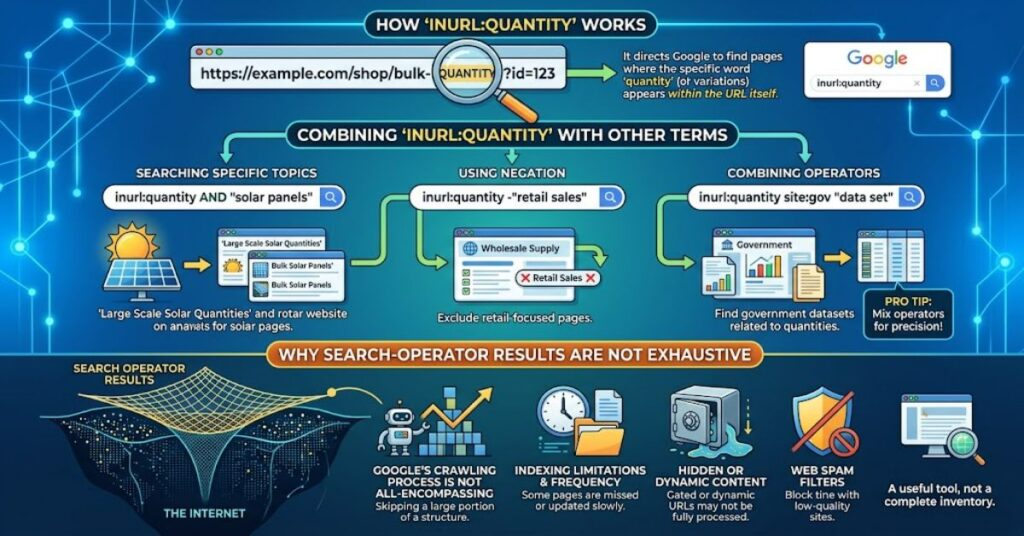
The query inurl:quantity is a Google search operator used to narrow search results by looking for the word “quantity” in a page’s URL. In practical terms, it can help users discover indexed pages where that term appears somewhere in the URL structure, such as a directory, filename or path.
For example, a search using inurl:quantity may surface pages with URLs containing a structure such as /quantity/, /product-quantity/ or another URL segment containing the same word. The exact results depend on what Google has indexed and what its retrieval systems choose to return.
The important point is that inurl:quantity is not a search for the word only within page copy. It is intended to narrow the search using URL information.
That makes it useful for a different kind of research. Instead of asking only, “Which pages discuss quantity?”, the search becomes closer to, “Which indexed pages have quantity represented in their URL?”
Google’s documentation confirms that search operators can be used to refine or target searches, while also warning that operator results are subject to indexing and retrieval limitations.
How to Use inurl:quantity
The basic format is simple:
inurl:quantity
The operator and its target term should be written together, without a space. Google also advises that search operators generally require the operator to be placed directly before its search term.
You can combine the operator with ordinary keywords to make the search more specific.
| Search query | Main purpose |
| inurl:quantity | Find results associated with “quantity” in the URL |
| inurl:quantity food | Narrow results towards food-related pages |
| inurl:quantity ecommerce | Focus on online retail and commerce |
| inurl:quantity inventory | Investigate stock or inventory-related results |
| inurl:quantity “minimum order” | Combine URL targeting with an exact phrase |
The advantage of combining operators with ordinary terms is control. A broad operator query can produce results from unrelated industries, while an additional keyword establishes context.
Why URL-Based Searching Matters
A URL is more than an address. Its structure can reveal how a website organises information.
For SEO professionals, URLs may indicate categories, products, articles, directories or other content groups. Google recommends using descriptive URLs because readable structures can help users and search engines understand what a page represents.
That makes URL-focused searching potentially useful for competitive research.
Suppose a researcher is studying how websites organise pages around stock levels, measurements or purchasing quantities. Searching for inurl:quantity can expose examples of URL structures that might otherwise be difficult to discover through ordinary keyword searches.
However, this should be treated as a discovery technique rather than a definitive audit.
Google does not promise that a search operator will display every matching indexed URL. Its documentation specifically states that search-operator results are affected by indexing and retrieval limits.
inurl:quantity Compared With Other Search Techniques
Different operators answer different research questions. The most useful approach is to select the operator based on the information you need.
| Technique | What it targets | Typical use |
| inurl:quantity | URL-related term | URL and content discovery |
| site:example.com | Specific domain | Site-focused research |
| Quotation marks | Exact word or phrase | Exact-match searching |
| Minus sign | Excluded term | Removing unwanted results |
| filetype: | File type | Finding particular document formats |
For example, site: is particularly useful when research needs to be restricted to a particular domain. Google explains that site: can target a domain, URL or URL prefix, although its results are not necessarily exhaustive.
This illustrates an important principle: search operators are filters, not databases.
Practical Uses for SEO Research
One useful application of inurl:quantity is URL pattern discovery.
An SEO researcher could use the query to examine how different websites incorporate the concept of quantity into their URL structures. The resulting pages might reveal patterns around product pages, category structures, guides or transactional content.
A second use is content discovery. If a researcher adds a subject term, the operator can narrow the results to a more specific topic.
A third application is competitor analysis. Looking at URL patterns across search results can provide clues about how competing websites organise related content.
These observations should then be checked manually. A URL alone does not reveal whether a page is authoritative, useful, technically strong or relevant to a particular search intent.
Three Useful Research Insights
URL structure is a signal, not proof of topical relevance. A page containing “quantity” in its URL may discuss the subject only indirectly.
Search operators are strongest when combined. Adding ordinary terms or another operator can reduce noise and produce more useful research sets.
Search results should be validated independently. Google’s own documentation warns that operator results can be limited by indexing and retrieval systems.
Risks and Limitations
The biggest mistake with inurl:quantity is assuming that the results represent every URL containing the term.
They do not.
Google’s search index is not a public catalogue that guarantees complete retrieval through an operator. Results can vary, and a missing result does not necessarily mean that a page does not exist or has never been indexed.
There is also a distinction between URL relevance and content relevance. A URL containing “quantity” might belong to a page whose main subject is something else entirely.
For website auditing, Google’s documentation recommends using more reliable tools such as URL Inspection in Search Console when the objective is to diagnose indexing or serving issues.
The operator is therefore best used as a research shortcut, not as a replacement for technical SEO tools.
The Future of inurl:quantity in 2027
Search operators are likely to remain useful for researchers because they offer a fast way to construct specialised queries. Their value, however, depends on how search engines expose and retrieve indexed information.
By 2027, SEO workflows are also likely to rely more heavily on dedicated crawling, analytics and search-console data for comprehensive technical research. That does not make operators obsolete. Instead, their role is better understood as an initial discovery layer.
For narrow investigations, an operator such as inurl:quantity can still save time by producing a targeted starting set. More rigorous analysis should then move into controlled datasets and first-party technical tools.
The uncertain factor is Google’s future treatment of search operators. Search functionality changes over time, so practitioners should verify current behaviour rather than assuming an operator will always behave identically.
Key Takeaways
- inurl:quantity targets searches around the word “quantity” in URL structures.
- It can support SEO research, competitor analysis and content discovery.
- Combining it with ordinary keywords can reduce irrelevant results.
- URL presence does not guarantee topical relevance.
- Search-operator results are not guaranteed to be exhaustive.
- Technical audits should use dedicated tools where completeness matters.
- The most effective workflow combines search operators with manual validation and structured SEO analysis.
Conclusion
inurl:quantity is a small but useful search technique for people who need more control over Google results. Instead of searching only the visible subject matter of a page, it introduces the URL itself as part of the research filter.
That makes it particularly relevant to SEO specialists, researchers and technically minded search users investigating URL structures or discovering narrowly defined content.
Its limitations are equally important. Google does not guarantee exhaustive results from search operators, and a matching URL does not automatically establish topical authority or relevance. The best approach is therefore to use inurl:quantity as a discovery mechanism, then validate what it finds through direct page review and appropriate technical tools.
Used this way, the operator is less about finding a perfect list and more about asking Google a more precise question.
FAQ
What is inurl:quantity?
It is an advanced Google search query used to target results associated with the word “quantity” in the URL. It can help identify pages with that term in their URL structure.
Does inurl:quantity search the page content?
Its purpose is to target the URL rather than simply searching for “quantity” as ordinary page text. Results can still contain other relevant content because Google evaluates the complete query.
Can inurl:quantity find every URL containing quantity?
No. Search operators have indexing and retrieval limitations, so results should not be treated as a complete list of all matching URLs.
Can I combine inurl:quantity with other keywords?
Yes. Adding terms such as “inventory”, “ecommerce” or another subject can make the results more focused.
Is inurl:quantity useful for SEO?
It can be useful for URL research, content discovery and competitor analysis. It should complement, rather than replace, crawling and first-party SEO tools.
What is the difference between inurl and site?
An inurl query focuses on URL-related terms, while site: restricts results to a specified domain, URL or URL prefix.
Methodology
This article treats inurl:quantity as a search-operator explainer rather than an indexing audit. The core terminology and intended use were taken from the supplied editorial brief. Google’s current search documentation was used to validate the broader behaviour and limitations of search operators.
No firsthand testing claim has been invented. Search results can vary by query, location, indexing state and Google’s retrieval systems, so examples are illustrative rather than guarantees. The article also distinguishes URL discovery from comprehensive technical auditing.
References
Google Search Central. (2025). Debugging with Google Search Operators. Google for Developers.
Google Search Central. (2025). Site search operator. Google for Developers.
Google Search Central. (2025). URL structure best practices for Google Search. Google for Developers.
Google Search Help. (2026). Refine Google searches. Google Support.