
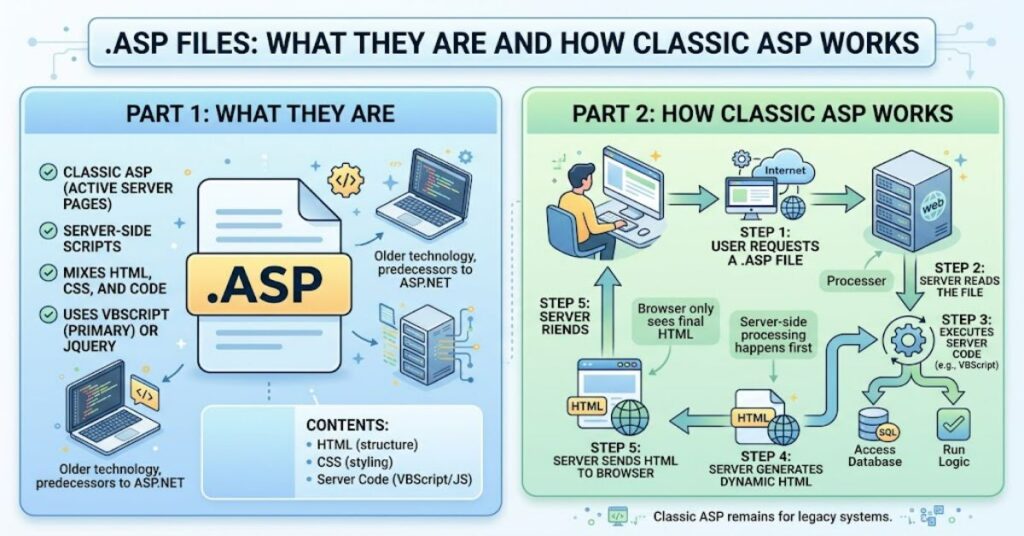
The .asp files extension identifies a web page built with Microsoft’s Active Server Pages technology, commonly called Classic ASP. Unlike an ordinary HTML file, an .asp page can contain server-side instructions that are processed before the resulting response is sent to a visitor’s browser.
Microsoft introduced Active Server Pages during the era of Internet Information Server, later renamed Internet Information Services (IIS). The technology helped developers build database-driven and interactive websites without requiring a separate modern application framework. Microsoft describes Classic ASP as a server-side scripting environment that can combine HTML, script commands and COM components to create dynamic web applications.
The important distinction today is between Classic ASP and ASP.NET. They are related historically but are not the same programming model. Classic ASP uses an older scripting architecture, while ASP.NET was developed as Microsoft’s more structured web-development platform.
For anyone encountering an .asp URL, therefore, the extension provides useful historical and technical information. It usually indicates that IIS is processing the page using the Classic ASP engine rather than simply serving a static document.
What Is an .asp File?
An .asp file is essentially a text-based web document containing HTML and server-side scripting. Classic ASP commonly used VBScript, although other scripting languages could be supported through appropriate scripting engines.
A simplified page might contain ordinary HTML alongside ASP delimiters:
<%
Response.Write “Hello”
%>
The server processes the script and sends the resulting HTML to the browser. The visitor normally sees the generated output rather than the server-side source code.
This server-side model made .asp useful for pages that needed database queries, form processing, authentication logic, sessions or dynamically generated content.
Microsoft’s documentation describes an ASP file as a text file using the .asp extension that can contain HTML, text and server-side scripts.
How Classic ASP Processes an .asp Page
The basic workflow is straightforward:
| Stage | What happens |
| Request | A browser requests an .asp URL |
| IIS | Internet Information Services receives the request |
| ASP engine | Classic ASP processes server-side instructions |
| Application logic | Scripts may access databases, objects or request data |
| Response | IIS returns generated HTML to the browser |
This architecture separates server processing from the browser. The client does not need to understand VBScript or the underlying database operations.
Classic ASP therefore belongs to an earlier generation of server-side web development. Its simplicity was useful, but many applications eventually developed large amounts of tightly coupled script, HTML and database logic.
.asp vs .html and .aspx
The file extension alone does not describe every capability of a website, but it provides an important clue about its technology stack.
| Extension | Typical technology | Server-side processing |
| .html | Static HTML | Usually none |
| .asp | Classic ASP | IIS Classic ASP |
| .aspx | ASP.NET Web Forms | ASP.NET |
| .php | PHP | PHP runtime |
| .jsp | Java/Jakarta Server Pages | Java-based server environment |
The distinction between .asp and .aspx is particularly important. An .aspx page belongs to ASP.NET, while .asp generally indicates Classic ASP. Existing Classic ASP code cannot simply be renamed from .asp to .aspx and expected to work.
Microsoft’s migration documentation explains that ASP.NET introduced substantial changes in areas including application structure, scalability, security, state management and deployment. Existing Classic ASP pages therefore require modification when moved to ASP.NET.
Why .asp Files Still Exist
Legacy does not necessarily mean inactive.
Microsoft’s current documentation states that ASP pages are supported in supported IIS versions, with the lifetime of ASP support tied to the support lifecycle of the Windows operating system hosting IIS. Classic ASP is also an optional IIS component rather than a default assumption on modern installations.
That matters for organisations with older applications. A company may have an internal management system, customer portal or database application that has been running for years and still depends on .asp pages.
Replacing such software can involve much more than changing file extensions. Business rules, database connections, authentication, third-party components and undocumented dependencies may all be embedded in the application.
The Main Risks of Maintaining Classic ASP
The biggest issue with an old .asp application is usually not the extension itself. It is the surrounding architecture.
One important risk is dependency management. Older applications can rely on COM components, database drivers or scripting behaviour that newer environments may not reproduce exactly.
A second concern is security configuration. IIS has introduced configuration changes over time. For example, parent paths are disabled by default in newer IIS configurations because allowing .. paths can create security and application-boundary concerns.
A third issue is database architecture. Microsoft specifically warns that Microsoft Access databases, historically common with Classic ASP applications, are not designed for scalable workloads and should not be treated as a suitable foundation for large-scale data-driven applications.
These limitations mean that an .asp application should be assessed as a complete system rather than judged solely by its file extension.
Three Practical Insights for Legacy .asp Systems
1. Inventory dependencies before migration.
A page-by-page count of .asp files is not enough. Teams should identify databases, COM components, includes, authentication mechanisms, scheduled tasks and external integrations before choosing a migration route.
2. Test IIS configuration separately from application logic.
An application can fail after migration because of server settings rather than defective business logic. Parent paths, request limits, permissions and ASP configuration should therefore be checked independently.
3. Migration does not always mean immediate replacement.
For a stable internal application with limited exposure, controlled maintenance may be less disruptive than a rushed rewrite. The decision should consider security requirements, business criticality, technical debt and the availability of replacement functionality.
The Future of .asp in 2027
Classic ASP is unlikely to become a leading choice for new web applications in 2027. Its continued presence is more closely connected to legacy systems that organisations still need to operate.
Microsoft continues to document Classic ASP configuration and deployment on IIS, meaning supported environments can still host these applications. At the same time, Microsoft’s development ecosystem has moved towards newer frameworks and cross-platform .NET technologies.
The practical direction is therefore likely to be maintenance, containment and gradual modernisation rather than significant new development in Classic ASP.
For organisations with .asp systems, 2027 planning should focus on dependency mapping, security hardening, automated testing and a realistic migration roadmap. The objective is not simply to remove an old extension but to reduce the operational risks associated with an ageing application architecture.
Key Insights
- .asp identifies Classic Active Server Pages rather than ASP.NET.
- IIS remains the central hosting environment for Classic ASP.
- Existing applications may remain viable when properly maintained.
- Database and COM dependencies can create migration difficulties.
- Security configuration should be reviewed before exposing legacy applications.
- A migration assessment should examine the entire system, not just .asp filenames.
Conclusion
The .asp extension is a small but useful clue to the architecture behind an older dynamic website. It points towards Microsoft’s Classic Active Server Pages technology, where IIS processes server-side scripts and generates the HTML returned to a browser.
Classic ASP played an important role in the development of database-driven websites, but its programming model predates modern web frameworks. That does not make every existing application unusable. Microsoft continues to document and support Classic ASP on supported IIS environments, while also providing extensive documentation around migration and modern .NET technologies.
For organisations still operating .asp systems, the sensible technical question is not simply whether the technology is old. It is whether the application remains secure, maintainable, compatible and appropriate for its workload. A careful inventory of dependencies and a staged modernisation plan can provide a more reliable path than an immediate rewrite.
Frequently Asked Questions
What does .asp mean?
.asp stands for Active Server Pages and normally identifies Microsoft’s Classic ASP server-side scripting technology.
Is .asp the same as ASP.NET?
No. Classic ASP and ASP.NET are different technologies. ASP.NET was developed later with a different programming model and architecture.
Can I open an .asp file in a browser?
You can request an .asp page through a properly configured IIS server. Opening the source file directly does not reproduce its server-side processing.
Are .asp files still supported?
Microsoft states that ASP pages are supported on supported IIS versions, with support tied to the lifecycle of the underlying Windows operating system.
Can an .asp website run on modern IIS?
Yes, Classic ASP can be installed and configured as an IIS component. Compatibility should still be tested because older applications may depend on legacy settings or components.
Should an .asp website be migrated?
Migration depends on the application’s security requirements, business importance, dependencies, maintenance cost and future development needs. There is no universal requirement to replace every existing .asp application immediately.
Methodology
This article .asp files was developed using Microsoft’s official IIS and Active Server Pages documentation, including material covering Classic ASP support, IIS configuration, .asp files, deployment, database considerations and migration. The analysis distinguishes documented Microsoft behaviour from forward-looking interpretation.
The main limitation is that no hands-on test of a specific .asp application was conducted. Consequently, the article does not claim direct testing or firsthand performance measurements. Compatibility can vary considerably according to IIS configuration, operating-system version, database drivers, COM components and application code.
Editorial disclosure: This article was drafted with AI assistance and should be reviewed and independently verified by a Postcard.fm editor before publication.
References
Microsoft. (2020). Classic ASP applications on IIS 7.0 and IIS 7.5 overview. Microsoft Learn.
Microsoft. (2020). Scenario: Build a Classic ASP website on IIS. Microsoft Learn.
Microsoft. (2020). Deploying a Classic ASP server. Microsoft Learn.
Microsoft. (2022). Classic ASP parent paths are disabled by default. Microsoft Learn.
Microsoft. (2024). Active Server Pages (ASP) support in Windows. Microsoft Learn.
Microsoft. (2024). ASP limits. Microsoft Learn.
Microsoft. (2022). Using Classic ASP with Microsoft Access databases on IIS. Microsoft Learn.
Microsoft. (2014). Migrating ASP pages to ASP.NET. Microsoft Learn.