
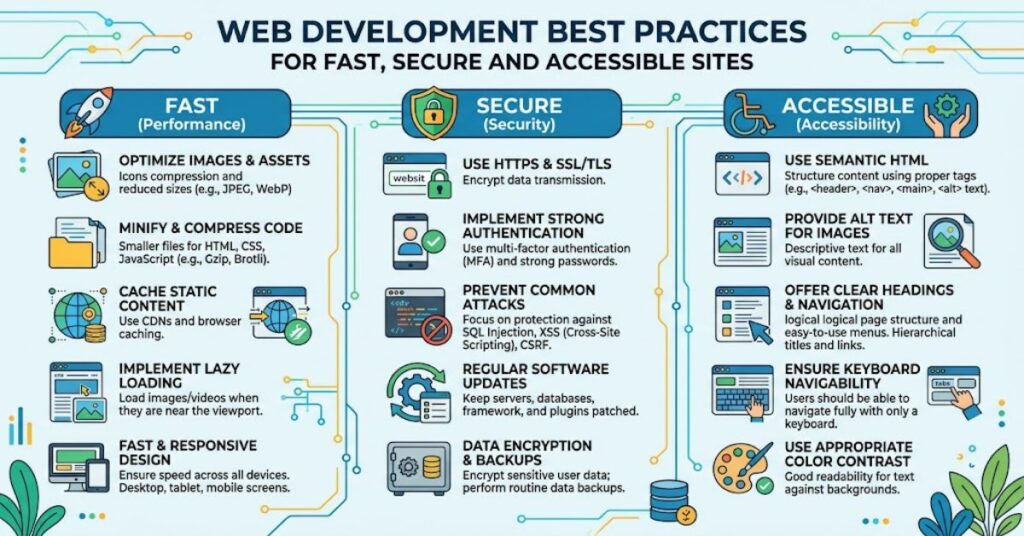
Following web development best practices ensures your applications are fast, secure, accessible and maintainable. Modern websites are no longer simple collections of HTML pages. They often combine APIs, databases, JavaScript frameworks, third-party services, analytics, authentication systems and cloud infrastructure.
That complexity creates trade-offs. Adding another library may speed up development but increase JavaScript execution. A visually impressive interface may become difficult to navigate with a keyboard. A convenient third-party integration may introduce a new supply-chain dependency.
The strongest development approach therefore starts with fundamentals: clear separation of concerns, semantic markup, responsive layouts, efficient assets, secure data handling and repeatable testing.
The 2025 Web Almanac analysed more than 16 million websites using HTTP Archive data. Its findings show that only 48% of mobile websites and 56% of desktop websites achieved good Core Web Vitals in 2025.
That gap illustrates an important point: modern tools do not automatically produce good websites. Implementation decisions still matter.
Build for Performance from the Start
Performance is more than page-load speed. Modern measurement considers loading, responsiveness and visual stability through Largest Contentful Paint (LCP), Interaction to Next Paint (INP) and Cumulative Layout Shift (CLS). The 2025 Web Almanac uses thresholds of 2.5 seconds for good LCP, 200 milliseconds for good INP and 0.1 or lower for good CLS.
Practical improvements include:
- Compressing CSS, JavaScript and other resources.
- Serving appropriately sized responsive images.
- Lazy-loading non-critical images and embedded content.
- Reducing unnecessary JavaScript.
- Avoiding render-blocking resources.
- Reserving image dimensions to reduce layout movement.
MDN specifically recommends responsive images and native lazy loading as ways to reduce unnecessary network usage and improve loading behaviour.
A useful distinction is between download weight and execution cost. JavaScript consumes resources when it is downloaded and again when it executes. HTTP Archive describes this as a “double tax”, particularly when websites accumulate scripts from multiple sources.
Performance Priorities
| Area | Practical approach | Main benefit |
| Images | Responsive formats, compression, lazy loading | Lower transfer size |
| JavaScript | Code splitting and removing unused code | Better responsiveness |
| CSS | Remove unnecessary blocking resources | Faster rendering |
| Fonts | Limit variants and optimise delivery | Reduced loading cost |
| Layout | Define image dimensions | Lower CLS |
Make Accessibility Part of the Architecture
Accessibility should not be treated as a final audit. Semantic HTML, keyboard navigation, visible focus states, useful alternative text and properly labelled forms are architectural choices.
WCAG 2.2 became a W3C Recommendation on 5 October 2023 and organises accessibility around four principles: perceivable, operable, understandable and robust.
For UK developers, accessibility also has a clear regulatory dimension. The Public Sector Bodies (Websites and Mobile Applications) Accessibility Regulations 2018 came into force on 23 September 2018 and require covered public-sector websites and apps to meet accessibility standards and publish an accessibility statement.
The 2025 Web Almanac found that colour contrast, link naming, heading structure and image alternative text remain among the most persistent accessibility problems.
This produces a useful development lesson: accessibility problems often result from ordinary implementation decisions rather than a lack of sophisticated technology.
Treat Security as a Development Requirement
Security cannot be separated from application design. Developers should validate input, protect authentication mechanisms, enforce authorisation on the server and avoid exposing sensitive information through client-side code.
OWASP’s 2025 Top 10 places broken access control first, followed by security misconfiguration and software supply-chain failures. The 2025 edition also identifies insecure design, authentication failures, injection and software or data integrity failures among the major application risks.
One important insight is that authentication and authorisation are not the same thing. Authentication establishes who a user is; authorisation determines what that user can do. A system can implement strong login controls while still exposing an administrative function because its authorisation rules are incomplete.
Dependencies deserve similar attention. Every external package, API and build tool expands the software supply chain. Dependency inventories, updates, vulnerability monitoring and lockfiles can reduce avoidable exposure.
Use Clear Architecture and Separation of Concerns
Maintainability improves when responsibilities are separated. Presentation logic should not become a dumping ground for business rules, while database operations should not be scattered throughout interface components.
A practical structure separates:
- Presentation — interface and interaction.
- Application logic — workflows and business rules.
- Data access — databases and external services.
- Infrastructure — deployment, monitoring and configuration.
This separation makes testing easier and allows individual components to change without destabilising the entire application.
The trade-off is additional structure. Small projects do not need enterprise-level abstraction. Overengineering can create more files, interfaces and dependencies than the problem requires.
Test More Than Whether the Page Works
A website that works on a developer’s laptop may fail under real network, device or accessibility conditions.
| Test type | What it reveals |
| Unit testing | Errors in individual functions |
| Integration testing | Problems between components or services |
| End-to-end testing | Broken user journeys |
| Accessibility testing | Keyboard, semantic and assistive-technology barriers |
| Performance testing | Loading and interaction bottlenecks |
| Security testing | Vulnerabilities and unsafe configurations |
A strong workflow combines automated checks with human review. Automated tools are excellent at finding repeated technical problems, but they cannot fully judge whether navigation is understandable or whether an interaction makes sense to users.
The Future of Web Development Best Practices in 2027
By 2027, development workflows are likely to place even greater emphasis on measurable user experience, automated quality controls and software supply-chain security.
The direction is already visible. The 2025 Web Almanac reports improving mobile INP performance while also finding increased JavaScript execution pressure, showing that optimisation is becoming more focused on actual interaction rather than simple page-load measurements.
Accessibility is also becoming more systematic as WCAG 2.2 matures as an established standard. Meanwhile, OWASP’s 2025 update gives greater prominence to software supply-chain failures, reflecting the increasing complexity of modern development ecosystems.
The likely constraint is not access to frameworks or development tools. It is disciplined implementation. More automation can identify problems faster, but teams still need sensible architecture and clear quality thresholds.
Key Takeaways for Developers
- Measure performance using real-user data where possible.
- Keep JavaScript purposeful rather than simply reducing its file size.
- Use semantic HTML before adding complex interface abstractions.
- Treat accessibility as part of product design.
- Separate authentication from authorisation.
- Maintain visibility over third-party dependencies.
- Match architectural complexity to the actual needs of the project.
Conclusion
Good web development is less about choosing a fashionable framework and more about making consistent engineering decisions. Performance, security, accessibility and maintainability reinforce one another when they are considered from the beginning.
The evidence from HTTP Archive shows that even widely used websites continue to encounter performance and accessibility problems. That makes basic engineering discipline surprisingly valuable.
The strongest projects establish clear standards for code quality, performance budgets, accessibility, testing and security before those concerns become expensive to fix. They also recognise the limits of automation and combine tooling with human review.
For developers, the practical goal is straightforward: build interfaces that work reliably for real people, on real devices, under real constraints.
FAQ
What are the main web development best practices?
The core areas are performance, accessibility, responsive design, security, maintainable architecture, testing, dependency management and reliable deployment.
How can developers improve Web development best practices?
Optimise images, reduce unnecessary JavaScript, compress resources, use lazy loading where appropriate and monitor Core Web Vitals with real-user data.
Why is accessibility important in web development?
Accessibility allows people with different abilities and assistive technologies to use digital services. WCAG 2.2 provides an established framework for implementation and testing.
What is the difference between authentication and authorisation?
Authentication verifies identity. Authorisation determines which resources or actions that authenticated user is permitted to access.
How does OWASP help web developers?
The OWASP Top 10 provides a widely used awareness framework for major web application security risks and is updated as threat patterns change.
Should every website use the same architecture?
No. Architecture should reflect the application’s scale, risk, team structure, performance requirements and expected rate of change.
Methodology
This article Web development best practices was developed using current technical documentation and large-scale web measurement rather than invented testing or personal performance claims. Sources included HTTP Archive’s 2025 Web Almanac, W3C’s WCAG documentation, OWASP’s 2025 Top 10, MDN Web Docs and GOV.UK accessibility guidance. The analysis is limited by differences between individual websites, users, devices and application architectures. Performance benchmarks should therefore be treated as contextual rather than guarantees.
References
- Government Digital Service. (2024). Meet the requirements of equality and accessibility regulations. GOV.UK.
- Jariyal, H., Rasam, P., Humaira, H., & Grogg, A. T. (2025). Performance. In The 2025 Web Almanac. HTTP Archive.
- Mozilla Developer Network. (2026). Author fast-loading HTML pages. MDN Web Docs.
- Mozilla Developer Network. (2026). Web performance best practices & tips. MDN Web Docs.
- Open Worldwide Application Security Project. (2025). OWASP Top 10:2025. OWASP Foundation.
- World Wide Web Consortium. (2023). Web Content Accessibility Guidelines (WCAG) 2.2. W3C.
- World Wide Web Consortium. (2023). What’s new in WCAG 2.2. W3C.
Editorial note: The required human editorial verification remains necessary before publication, particularly for statistics, dates, references, author credentials and any internal links.