
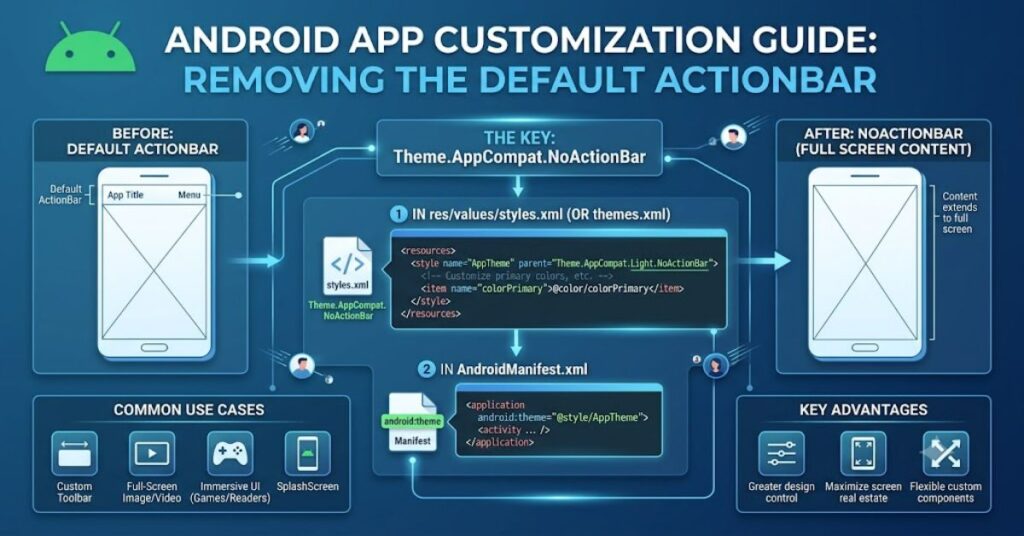
theme.appcompat.noactionbar is a built-in Android Jetpack configuration style used to remove the default native top action bar from an application or specific activities. Developers often choose this approach when they want complete control over navigation, branding, and screen layout by implementing their own Toolbar component.
In modern Android development, user interface flexibility is a major priority. While the default ActionBar provides basic navigation and title display features, it can become restrictive when applications require custom designs, advanced animations, branded layouts, or Material Design components.
The AppCompat library, now maintained as part of AndroidX, introduced better backward compatibility across Android versions. Using a NoActionBar theme allows developers to avoid conflicts between the system-provided ActionBar and manually created toolbar layouts.
This configuration does not remove toolbar functionality. Instead, it transfers responsibility from the framework to the developer. A custom Toolbar can then be controlled through XML layouts and connected with activity logic using Android APIs.
Understanding Theme.AppCompat.NoActionBar
Android themes define the visual behaviour of applications and activities. They control elements such as colours, typography, window appearance, and system components.
The NoActionBar variant modifies the default AppCompat theme by disabling the automatically generated ActionBar.
| Component | Default Behaviour | NoActionBar Approach |
| ActionBar | Automatically created by Android | Removed from theme |
| Toolbar | Limited customisation | Fully developer controlled |
| Layout flexibility | Restricted by system UI | Custom XML positioning |
| Branding options | Basic | Advanced design control |
This configuration is particularly useful for applications requiring custom headers, search interfaces, profile sections, or complex navigation patterns.
Why Developers Replace the Default ActionBar
The traditional ActionBar was designed for earlier Android application structures. Although still supported, many modern applications require more sophisticated interface systems.
A custom Toolbar provides advantages including:
Design flexibility:
Developers can change height, colour, icons, animations, and placement according to product requirements.
Material Design compatibility:
Modern Android applications often use Material Components that integrate better with custom layouts.
Improved user experience:
A tailored navigation system can create smoother interactions compared with a standard system bar.
For example, applications with shopping dashboards, social feeds, or media interfaces often need controls that do not fit within the standard ActionBar structure.
How Theme.AppCompat.NoActionBar Works in Android Projects
The configuration is usually defined inside the application’s theme resources.
A typical workflow involves:
- Creating or selecting a NoActionBar theme.
- Applying the theme in the Android manifest.
- Adding a Toolbar element inside XML layouts.
- Connecting the Toolbar with activity code.
The developer replaces automatic system behaviour with explicit UI management.
| Development Area | Impact of NoActionBar |
| Theme configuration | Removes default ActionBar |
| XML layout | Adds custom Toolbar |
| Activity code | Handles toolbar functions manually |
| Testing | Requires checking multiple screen sizes |
This approach provides control but also increases developer responsibility.
Benefits and Trade-Offs
Like any architectural decision, removing the default ActionBar involves advantages and limitations.
Benefits
- Greater visual customisation
- Better control over navigation patterns
- Easier integration with modern UI frameworks
- Consistent branding across screens
Trade-Offs
- More implementation work
- Developers must manage toolbar behaviour manually
- Navigation features require additional configuration
A common mistake is assuming that removing the ActionBar automatically creates a better interface. The real benefit comes from thoughtful design and correct implementation.
Technical Considerations for Android Developers
Developers working with this configuration should understand several technical factors.
Theme Compatibility
Older applications may use the original Android Support Library, while newer projects typically use AndroidX libraries. Migration issues can occur if dependencies and themes are mixed.
Toolbar Configuration
A custom Toolbar must be correctly connected with the activity lifecycle. Functions such as navigation buttons, titles, and menus need explicit setup.
Device Compatibility
Android fragmentation means developers should test layouts across different screen sizes, operating system versions, and display settings.
The Future of Android UI Design in 2027
By 2027, Android interface development is expected to continue moving toward declarative UI frameworks, especially Jetpack Compose.
Traditional XML-based layouts remain important for many existing applications, but newer projects increasingly use modern approaches that reduce manual UI management.
The principles behind theme.appcompat.noactionbar will remain relevant because developers will continue needing control over application branding and navigation experiences.
Future Android development will likely focus on:
- Adaptive layouts for different devices
- More personalised interfaces
- Better accessibility support
- Faster UI development workflows
However, XML themes and Toolbar-based designs will continue supporting millions of existing applications.
Key Insights
- Removing the default ActionBar is mainly about gaining design control rather than simply hiding an interface element.
- Custom toolbars require stronger knowledge of Android lifecycle management.
- Theme configuration decisions affect long-term application maintenance.
- Android UI development is shifting toward modern frameworks, but legacy compatibility remains important.
- Developers must balance visual freedom with implementation complexity.
Conclusion
theme.appcompat.noactionbar remains an important Android development concept because it represents a shift from framework-controlled interfaces toward developer-controlled experiences. By removing the default ActionBar, developers gain the ability to create custom navigation systems and branded layouts.
The approach requires additional coding responsibility, but the flexibility it provides makes it valuable for many applications. From commercial products to complex mobile platforms, custom toolbar implementations continue to support modern interface requirements.
As Android development evolves, the tools may change, but the underlying principle remains the same: developers need control over how users interact with applications.
Frequently Asked Questions
What is theme.appcompat.noactionbar used for?
theme.appcompat.noactionbar is used to disable the default Android ActionBar so developers can create their own custom Toolbar designs.
Is NoActionBar recommended for modern Android apps?
Many modern applications use custom toolbar solutions because they provide better design flexibility and integration with current UI systems.
Does removing ActionBar remove navigation features?
No. Developers can recreate navigation features using Toolbar components, menus, and Android navigation libraries.
What is the difference between ActionBar and Toolbar?
ActionBar is a framework-managed component, while Toolbar is a flexible UI element that developers can place and customise manually.
Can NoActionBar themes work with Android Jetpack?
Yes. AppCompat and AndroidX support custom themes and Toolbar-based layouts used with Jetpack components.
Methodology
This article was prepared using official Android development concepts, documented AndroidX practices, and established software engineering principles.
The analysis focuses on the purpose, implementation considerations, and future relevance of NoActionBar themes. Limitations include differences between Android versions, project architectures, and evolving UI frameworks.
References
Android Developers. (2024). Develop app themes and styles. Google Android Documentation.
Android Developers. (2024). Toolbar and app bars documentation. Google Android Documentation.
Android Developers. (2024). AndroidX AppCompat library documentation. Google.