
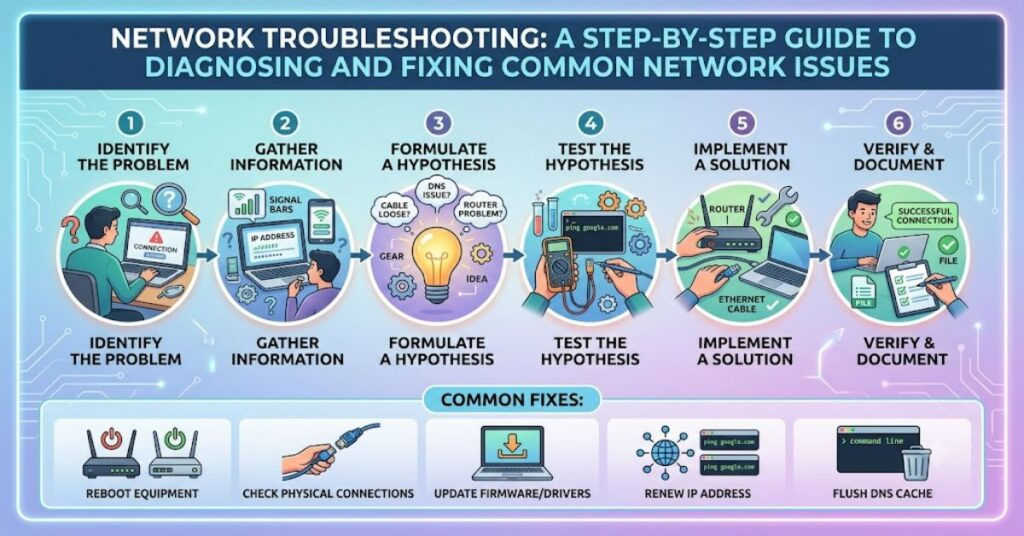
Network troubleshooting is the process of identifying, diagnosing, and resolving issues that affect communication between devices. Whether you’re dealing with slow internet, unreachable servers, or intermittent Wi-Fi, following a methodical approach saves time and prevents guesswork. The most effective strategy begins with checking physical connections, verifying IP configuration, testing connectivity with diagnostic tools, and finally confirming DNS and application services. Rather than replacing hardware or changing settings randomly, experienced network administrators isolate the problem one layer at a time.
Every organization depends on reliable network connectivity. Even a brief outage can interrupt communication, reduce productivity, and impact customer service. Understanding the fundamentals of troubleshooting allows IT professionals, students, and business users to resolve problems efficiently while minimizing downtime.
Why a Structured Troubleshooting Process Matters
Successful troubleshooting isn’t about trying random fixes. It follows a logical sequence that narrows the possible causes until the actual problem is identified.
A structured approach helps:
- Reduce network downtime.
- Avoid unnecessary hardware replacement.
- Improve documentation.
- Speed up incident resolution.
- Prevent recurring problems.
Many enterprise IT teams rely on documented workflows because consistency leads to faster recovery and better long-term network stability.
Using the OSI Model for Network Troubleshooting
The OSI (Open Systems Interconnection) model remains one of the most effective troubleshooting frameworks.
| OSI Layer | Common Problems | Example Solution |
| Physical | Damaged cables, faulty ports | Replace cable or port |
| Data Link | Switch or MAC address issues | Restart switch, verify MAC table |
| Network | Incorrect IP or routing | Check IP settings and gateway |
| Transport | Blocked TCP/UDP ports | Verify firewall rules |
| Session | Session timeout | Restart application session |
| Presentation | Encryption or formatting | Verify certificates |
| Application | DNS or application failure | Restart services or check DNS |
Starting at the Physical layer and moving upward helps isolate issues without overlooking basic problems.
Step-by-Step Network Troubleshooting Process
1. Check Physical Connections
Begin with the simplest checks.
Inspect:
- Ethernet cables
- Power supplies
- Router LEDs
- Switch ports
- Wireless access points
Loose cables account for more network issues than many people expect.
2. Verify IP Configuration
Incorrect IP settings frequently prevent communication.
Check:
- IP address
- Subnet mask
- Default gateway
- DNS server
- DHCP status
Commands like ipconfig (Windows) or ifconfig/ip addr (Linux) quickly reveal configuration problems.
3. Test Basic Connectivity
After confirming the device configuration, test communication.
Useful commands include:
- Ping
- Traceroute (tracert)
- Pathping
- MTR
These tools determine whether packets reach their intended destination and identify where failures occur.
4. Verify DNS Resolution
Many users think the internet is down when only DNS is failing.
Test:
- nslookup
- dig
- DNS cache
- Alternate DNS servers
If Ping works by IP address but not by hostname, DNS is usually the culprit.
5. Check Network Services
Sometimes the network is functioning correctly while the application itself has failed.
Examples include:
- Web servers
- Email servers
- VPN gateways
- Database services
- Authentication servers
Always verify the service before assuming the network is responsible.
Common Network Troubleshooting Tools
| Tool | Purpose | Typical Use |
| Ping | Test connectivity | Verify reachability |
| Traceroute | Identify routing path | Locate network interruption |
| ipconfig | View IP settings | Check configuration |
| nslookup | Test DNS | Resolve hostname issues |
| Wireshark | Capture packets | Advanced traffic analysis |
Each tool provides different information, making them valuable during different stages of troubleshooting.
Real-World Troubleshooting Example
Consider an office where employees suddenly lose internet access.
Following a structured process:
- Confirm router power.
- Check switch indicators.
- Verify DHCP assignment.
- Ping the default gateway.
- Ping an external IP address.
- Test DNS resolution.
- Verify ISP connectivity.
Instead of replacing hardware immediately, this workflow isolates the exact point of failure. In many cases, the issue turns out to be a disconnected cable, expired DHCP lease, or DNS outage rather than a failed router.
Risks of Poor Troubleshooting
Randomly changing settings can create additional problems.
Common mistakes include:
- Rebooting multiple devices simultaneously.
- Changing firewall rules without documentation.
- Replacing equipment before diagnosis.
- Ignoring system logs.
- Skipping basic physical checks.
These actions often make the original issue harder to identify.
The Future of Network Troubleshooting in 2027
By 2027, network troubleshooting is expected to become increasingly automated through artificial intelligence and predictive monitoring. Modern network management platforms already analyze telemetry, identify anomalies, and recommend corrective actions before users notice problems.
Cloud networking, Software-Defined Networking (SDN), and AI-powered monitoring tools will continue reducing manual troubleshooting. However, skilled network professionals will remain essential because complex environments still require human judgment, security expertise, and an understanding of business requirements.
Key Takeaways
- Always troubleshoot methodically instead of guessing.
- Begin with physical hardware before checking software.
- The OSI model provides a reliable diagnostic framework.
- Diagnostic tools simplify fault isolation.
- Documentation prevents repeated incidents.
- DNS problems are often mistaken for internet outages.
Conclusion
Network troubleshooting is both a technical skill and a disciplined process. While networking technologies continue evolving, the core principles remain unchanged: verify the basics, isolate the problem systematically, and use appropriate diagnostic tools. A structured approach minimizes downtime, improves reliability, and reduces unnecessary costs associated with replacing functioning equipment.
Whether managing a home network or supporting an enterprise infrastructure, following the OSI model and documenting every troubleshooting step produces faster, more consistent results. As automation becomes more common, understanding these foundational techniques will remain an essential skill for IT professionals.
FAQ
What is network troubleshooting?
Network troubleshooting is the systematic process of identifying and resolving communication problems between connected devices.
Why is the OSI model useful for troubleshooting?
It divides networking into layers, making it easier to isolate faults instead of checking every component simultaneously.
Which command should I use first?
Most administrators start with Ping to verify basic connectivity before moving to advanced tools.
How do I know if DNS is the problem?
If you can reach an IP address but not a website name, DNS resolution is likely failing.
What is the most common networking issue?
Physical connectivity problems, incorrect IP configuration, and DNS errors are among the most common causes of network failures.
Methodology
This article is based on established networking principles, standard enterprise troubleshooting practices, and widely accepted networking frameworks such as the OSI model. The workflow reflects common IT operations used to diagnose connectivity issues while acknowledging that individual network environments may require additional vendor-specific procedures.
References
- Cisco Systems. Network Troubleshooting Best Practices.
- CompTIA. Network+ (N10-009) Objectives.
- Microsoft Learn. Windows Networking Documentation.
- Wireshark Foundation. Wireshark User Guide.