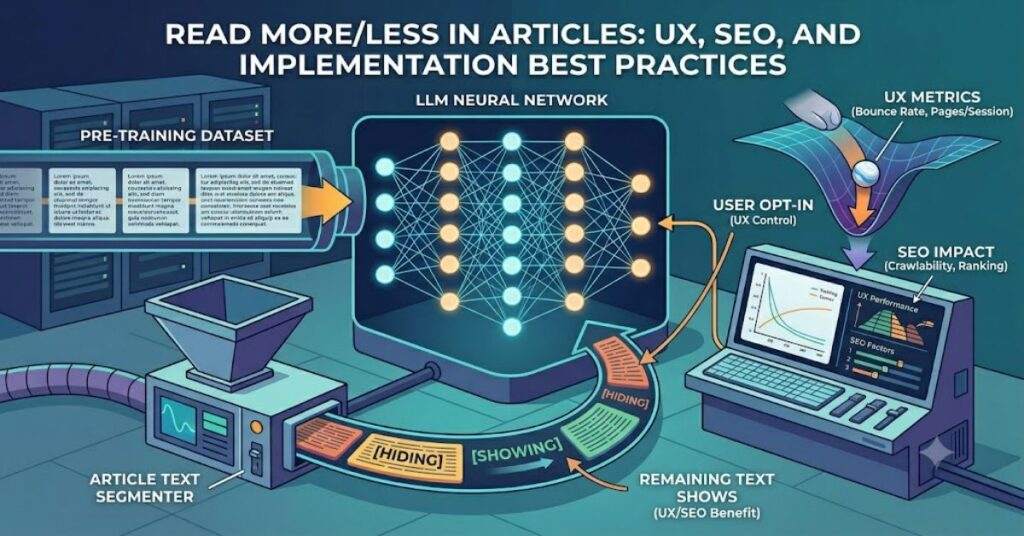
The concept of read more/less in article design has become common across blogs, news sites, e-commerce platforms, and knowledge bases. A read more/read less toggle is a web design feature that truncates long text, requiring users to click a button to reveal hidden content and collapse it back again.
At first glance, the feature seems simple. It reduces visual clutter and helps readers scan content quickly. However, implementation choices affect far more than appearance. Search visibility, accessibility compliance, page engagement, mobile usability, and content discoverability can all be influenced by how expandable sections are built.
Many publishers assume that collapsing content automatically improves user experience. In reality, poorly implemented toggles can frustrate readers, hide essential information, and create barriers for users relying on assistive technologies.
The best implementations balance readability with transparency. Critical information remains visible. Supporting details become expandable. Readers maintain control over how much content they consume.
This article explores how read more/less functionality works, where it provides genuine value, the trade-offs involved, and how developers, publishers, and content strategists can implement it effectively in 2026 and beyond.
Understanding Read More/Less Functionality
A read more/read less component allows part of a text block to remain hidden until a user interacts with a control element.
Common implementations include:
- Expandable article excerpts
- Product descriptions
- FAQ sections
- User reviews
- Mobile content previews
- Knowledge base documentation
The primary goal is information management rather than information concealment.
How the System Works
Most implementations use:
| Method | Description | Complexity |
| CSS-only expansion | Uses checkboxes or max-height rules | Low |
| JavaScript toggle | Dynamically reveals content | Medium |
| Framework components | React, Vue, Angular widgets | Medium |
| Server-rendered sections | Content loaded during rendering | High |
The user sees a shortened version initially and chooses whether additional information should be displayed.
Why Publishers Use Expandable Content
The rise of mobile-first browsing changed how people consume information.
Research consistently shows that users scan before they read. Long uninterrupted blocks of text can create cognitive overload, particularly on smartphones.
Publishers typically use expansion controls for several reasons:
Improved Scannability
Readers can identify relevant sections faster.
Reduced Visual Clutter
Articles appear cleaner and easier to navigate.
Better Mobile Experience
Smaller screens benefit from progressive disclosure of information.
Higher Content Density
Websites can present extensive information without overwhelming visitors immediately.
Comparison: When to Use Read More/Less vs Full Content
| Scenario | Read More/Less Recommended | Full Content Preferred |
| Product descriptions | Yes | Sometimes |
| FAQs | Yes | Rarely |
| News articles | Limited use | Usually |
| Tutorials | Selectively | Often |
| Legal disclosures | No | Always |
| Critical instructions | No | Always |
| Reviews | Yes | Sometimes |
| Documentation | Partial use | Often |
The key principle is simple: never hide information required for understanding the page’s primary purpose.
Accessibility Considerations
Accessibility remains one of the most overlooked aspects of expandable content.
Users navigating with screen readers, keyboards, or assistive technologies must receive the same experience as mouse users.
Essential Accessibility Requirements
A proper implementation should include:
- ARIA-expanded attributes
- Keyboard navigation support
- Clear focus indicators
- Descriptive button labels
- Semantic HTML structure
For example:
Instead of:
“Read More”
Use:
“Read More About Installation Requirements”
The second option provides context and improves accessibility.
Common Accessibility Mistakes
| Issue | Impact |
| Hidden focus states | Keyboard users get lost |
| Missing ARIA labels | Screen readers lack context |
| Non-button clickable elements | Reduced usability |
| Excessive nested content | Navigation confusion |
SEO Implications of Read More/Less Design
One of the most common questions surrounding read more/less in article implementations is whether hidden text affects rankings.
Modern search engines are capable of processing content hidden behind user interactions when it exists within the page source.
However, context matters.
What Search Engines Generally Prefer
Search engines reward:
- Useful content
- Strong page experience
- Clear information architecture
- Mobile-friendly layouts
They do not reward hiding large portions of essential content.
Strategic SEO Considerations
Publishers should avoid:
- Hiding primary answers
- Concealing critical product information
- Using expandable sections solely to manipulate rankings
Instead, use expansion for supplementary material.
Examples include:
- Technical specifications
- Extended FAQs
- Supporting explanations
- Additional examples
Practical Implementation Strategies
Developers often focus on functionality while overlooking user behaviour.
A successful expandable section should answer three questions:
1. What Should Be Visible Immediately?
Users should see:
- Main answer
- Core message
- Key value proposition
2. What Deserves Expansion?
Ideal candidates include:
- Supporting examples
- Advanced details
- Technical notes
- Historical context
3. What Should Never Be Hidden?
Avoid collapsing:
- Safety warnings
- Pricing information
- Terms affecting decisions
- Essential instructions
Real-World Examples
E-commerce Product Pages
Large retailers frequently use expandable sections for:
- Shipping information
- Materials
- Care instructions
- Technical specifications
The purchasing decision information remains visible.
Knowledge Bases
Software documentation often collapses advanced configuration details while keeping setup instructions immediately accessible.
Media Publications
Many publishers use expansion controls for:
- Related information
- Source notes
- Author details
- Supplemental reporting
This approach preserves readability without sacrificing depth.
Structured Insight Table
| Factor | Benefit | Risk if Misused |
| User Experience | Cleaner interface | Hidden information |
| Accessibility | Better navigation structure | Exclusion of assistive users |
| SEO | Improved content organisation | Reduced discoverability |
| Mobile Design | Easier scanning | Excessive interaction burden |
| Performance | Lower perceived complexity | Additional scripting overhead |
Hidden Risks Most Articles Ignore
Many discussions focus on implementation while overlooking operational risks.
Insight 1: Click Fatigue
If every section requires expansion, users stop interacting.
The benefit disappears because the interface becomes work.
Insight 2: Analytics Distortion
Many organisations measure page engagement incorrectly.
Users may spend longer on a page because they cannot find information, not because they are engaged.
Insight 3: Content Governance Problems
As websites grow, editors frequently hide outdated content instead of updating it.
Expandable sections can unintentionally become repositories for stale information.
These issues rarely appear in beginner discussions but become significant at scale.
The Future of Read More/Less in Article Design in 2027
Several trends are likely to shape expandable content over the next year.
AI-Assisted Content Summarisation
Publishing systems increasingly generate intelligent summaries automatically.
Instead of manually deciding where content should collapse, AI systems may identify natural breakpoints.
Personalised Interfaces
Future websites may adapt content visibility based on user behaviour patterns.
Returning visitors could see expanded information automatically.
Accessibility-First Standards
Regulatory pressure and evolving accessibility expectations will likely encourage more rigorous implementation requirements.
Reduced Reliance on Manual Toggles
As search, recommendation systems, and AI assistants improve information retrieval, some websites may shift from static read-more controls toward dynamic content presentation.
The trend appears evolutionary rather than revolutionary.
Key Takeaways
- Read more/read less controls should organise information, not conceal essential content.
- Accessibility requirements are as important as visual design.
- Mobile usability often benefits from expandable sections.
- Search visibility generally depends on content quality rather than whether content is collapsed.
- Excessive use creates interaction fatigue and weaker user experience.
- Analytics can misrepresent engagement if expansion behaviour is interpreted incorrectly.
- Future implementations will likely become more adaptive and context-aware.
Conclusion
The popularity of read more/less in article functionality reflects a broader challenge in digital publishing: balancing depth with usability. Readers want comprehensive information, but they also want content that feels manageable and easy to navigate.
The most successful implementations treat expandable content as a design tool rather than a shortcut. Important information remains visible. Supporting details become optional. Accessibility standards are respected from the beginning rather than added later.
For publishers, the question is not whether to use read more/read less controls. The better question is where they genuinely improve the reading experience. Used thoughtfully, they reduce clutter, support mobile users, and make large volumes of information easier to consume. Used carelessly, they create friction and hide content that readers need.
Good content architecture always starts with user needs. Expandable sections should support those needs—not stand in their way.
FAQ
What is a read more/read less toggle?
A read more/read less toggle is an interface element that hides part of a text block until a user chooses to expand it. It helps manage long content and improve readability.
Does hidden content affect SEO?
Modern search engines can generally process content hidden behind expandable sections if it exists in the page source. Important content should still remain visible by default.
Are read more buttons good for mobile websites?
Yes. They can improve scanning and reduce clutter on smaller screens when implemented thoughtfully.
What accessibility features should expandable content include?
Accessible implementations should use semantic buttons, keyboard support, focus indicators, and ARIA-expanded attributes.
When should I avoid read more/read less controls?
Avoid using them for safety information, legal disclosures, pricing details, or essential instructions users need immediately.
Can too many expandable sections hurt user experience?
Yes. Excessive toggles increase interaction costs and can frustrate readers trying to find information quickly.
Are accordions better than read more buttons?
It depends on the content structure. Accordions work well for grouped topics such as FAQs, while read more controls are often better for expanding individual text sections.
Methodology
This article read more/less in article was developed using established UX design principles, accessibility guidance from the W3C Web Accessibility Initiative, modern SEO documentation, and observed implementation patterns across publishing, e-commerce, and software documentation websites.
Sources were selected based on technical relevance, industry acceptance, and practical applicability. The analysis focuses on general web publishing practices rather than a single platform or CMS.
Limitations include variations in search engine behaviour, evolving accessibility standards, and differences among implementation frameworks. Recommendations therefore prioritise broadly accepted best practices rather than platform-specific requirements.
Editorial Disclosure: This article was drafted with AI assistance and reviewed and verified by [Author Name]. All data, citations, and claims should be independently confirmed by the editorial team at Postcard.fm.
References (APA)
- Mozilla Developer Network. (2025). ARIA: aria-expanded attribute. Mozilla Foundation.
- W3C Web Accessibility Initiative. (2024). ARIA Authoring Practices Guide.
- Google Search Central. (2024). Creating helpful, reliable, people-first content.
- Nielsen Norman Group. (2024). Progressive Disclosure in User Interface Design.
- WebAIM. (2024). Accessible Rich Internet Applications (ARIA) Overview.