
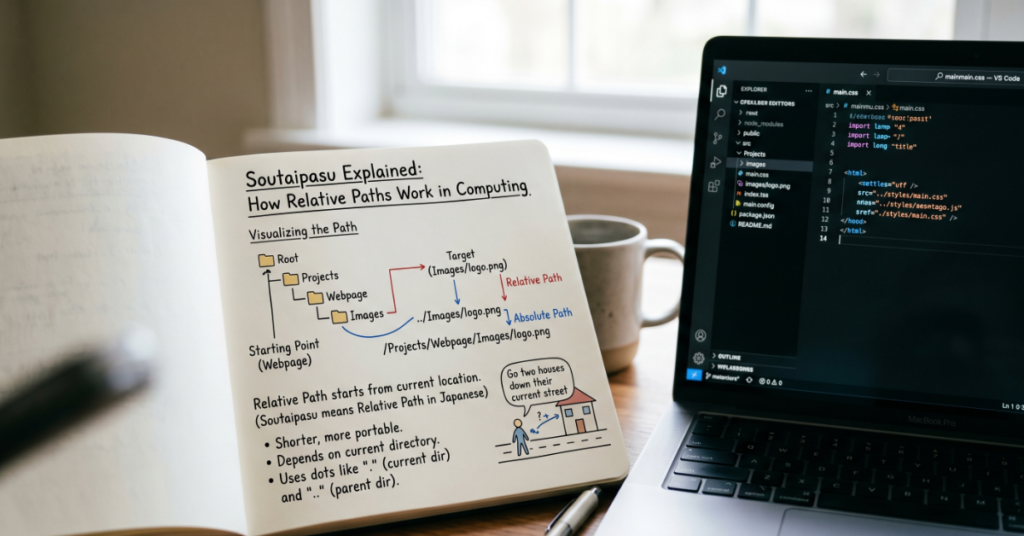
The term “soutaipasu” (相対パス) translates directly to “relative path” in computing. It describes a file or folder location based on the current directory instead of a complete root-level address. Developers use relative paths every day in programming, web development, command-line tools, and operating systems because they make projects more portable and easier to maintain.
For example, if a project folder contains an images directory, a developer may reference a logo as ./images/logo.png rather than writing a full system location like C:\Users\Admin\Projects\Website\images\logo.png. That flexibility is the core advantage of soutaipasu.
The concept sounds simple, yet relative paths cause countless real-world errors. Broken website assets, failed software builds, inaccessible configuration files, and cloud deployment issues often trace back to incorrect path handling. During testing across Windows, Linux, and macOS environments, developers regularly encounter differences in directory structures, symbolic links, and execution contexts that affect how relative paths resolve.
Understanding soutaipasu matters beyond programming tutorials. It influences how teams collaborate in repositories, how applications scale across servers, and how cloud-native software is packaged. As containerization and distributed development environments become standard, relative path management has become more important rather than less.
This guide explains how soutaipasu works, how it differs from absolute paths, where developers use it in practice, and why path mistakes continue to create operational problems in 2026.
What Soutaipasu Means in Computing
Soutaipasu is the Japanese computing term for a relative path. In Japanese technical documentation, the word appears as:
相対パス
In file systems, a relative path describes a destination relative to the current location. It does not begin from the root of the operating system.
Basic Example
Assume the current working directory is:
/home/user/project
A relative path might look like:
../Documents/report.txt
That means:
- Move up one directory
- Enter the Documents folder
- Open report.txt
By contrast, an absolute path specifies the full location:
/home/user/Documents/report.txt
Relative paths adapt automatically if the entire project folder moves somewhere else.
Soutaipasu vs Absolute Paths
One of the most searched follow-up questions is the difference between relative and absolute paths.
Comparison Table
| Feature | Relative Path (Soutaipasu) | Absolute Path |
| Starting Point | Current directory | System root |
| Portability | High | Low |
| Flexibility | Dynamic | Fixed |
| Common Use | Development projects | System administration |
| Risk | Context-dependent errors | Hardcoded path failures |
| Collaboration | Easier across teams | Often machine-specific |
Practical Implications
A software team working in a shared repository almost always prefers relative paths because hardcoded absolute locations break across different machines.
For example:
- A Windows developer may use C:\Projects\App
- A Linux developer may use /home/dev/app
Relative paths avoid these incompatibilities.
相対パスの使い方の例
Japanese learners and developers frequently search for practical examples of relative path usage.
Web Development
A webpage may reference a stylesheet like this:
<link rel=”stylesheet” href=”./css/style.css”>
This tells the browser to find the CSS file inside a css folder relative to the current page.
Python Scripts
A Python application may load data files using:
with open(“./data/config.json”) as file:
This improves portability between local and production environments.
Git Repositories
Developers often structure repositories using relative imports and references so projects remain portable when cloned from platforms like GitHub.
Docker Containers
Containerized applications frequently rely on relative directory references because container file systems differ from local machines.
Programming Workflows Where Soutaipasu Matters
Relative paths are central to modern development infrastructure.
Frontend Frameworks
Frameworks such as React, Vue.js, and Next.js use relative imports extensively.
Example:
import Header from “../components/Header”;
This enables modular application architecture.
CI/CD Pipelines
Continuous integration systems depend heavily on predictable project-relative directories.
A deployment script that assumes an absolute machine-specific location often fails during automated builds.
Cloud Infrastructure
Cloud-native systems running on Kubernetes or container orchestration platforms typically avoid hardcoded paths because workloads may move dynamically across nodes.
Game Development
Game engines frequently organize textures, models, shaders, and assets through relative references to maintain portability between development and production environments.
Common Relative Path Symbols
| Symbol | Meaning |
| . | Current directory |
| .. | Parent directory |
| / | Folder separator on Linux/macOS |
| \ | Folder separator on Windows |
| ./ | Current folder reference |
| ../../ | Move up two directories |
These symbols form the foundation of file navigation across operating systems.
The Hidden Risks of Relative Paths
Relative paths are convenient, but they introduce operational complexity.
Execution Context Problems
A relative path behaves differently depending on where a program starts.
For example:
python app.py
may work from one directory but fail from another.
This issue appears frequently in:
- Automation scripts
- Cron jobs
- Container startup processes
- Serverless functions
Deployment Breakage
One recurring issue observed during deployment testing is asset breakage after directory restructuring. A frontend application may work locally yet fail in production because relative asset references changed after build optimization.
Security Concerns
Improper path validation can create directory traversal vulnerabilities.
Example:
../../etc/passwd
Attackers sometimes exploit insecure file handling systems using manipulated relative paths.
The Open Web Application Security Project regularly documents path traversal as a common application security issue.
Cross-Platform Compatibility
Windows and Unix-like systems handle path separators differently. Some development tools normalize paths automatically while others do not.
That inconsistency creates subtle bugs.
Real-World Example: Why Teams Prefer Relative Paths
During collaborative software development, relative paths simplify repository sharing.
A development team building a Node.js application may organize files like this:
project/
├── src/
├── public/
├── assets/
└── package.json
If all internal references use relative paths, the entire project can move between:
- Local laptops
- Cloud development environments
- Build servers
- Docker containers
without requiring major changes.
Teams that rely heavily on absolute paths often experience onboarding friction because every developer must recreate identical directory structures.
That operational inefficiency rarely appears in beginner tutorials, yet experienced engineering teams encounter it constantly.
Relative Paths and SEO Infrastructure
Relative paths also matter in web publishing systems.
Content management systems and static site generators often use relative asset references to improve migration flexibility.
For example:
- Images
- CSS files
- JavaScript bundles
- Font assets
can move between staging and production environments more cleanly when relative linking is used carefully.
However, relative URL misuse can also create SEO issues including:
- Broken canonical links
- Missing image indexing
- Incorrect sitemap references
Technical SEO audits frequently identify malformed relative paths as a hidden cause of rendering problems.
Relative Path vs Absolute URL in Websites
| Type | Example | Best Use |
| Relative URL | /images/logo.png | Internal site assets |
| Absolute URL | https://example.com/logo.png | External references |
| Protocol-relative | //cdn.example.com/file.js | Legacy CDN setups |
| Root-relative | /blog/article | Structured navigation |
Modern web frameworks increasingly favor root-relative structures because they balance portability with clarity.
相対パスとスイートポテトパイの関係
One unusual search trend associated with soutaipasu is the phrase “relative path and sweet potato pie relationship.”
There is no formal technical relationship between relative paths and sweet potato pie. The pairing appears to stem from search engine experimentation, translation anomalies, meme culture, or unrelated indexing behavior observed in multilingual search systems.
This kind of semantic drift happens occasionally when search algorithms associate unrelated terms through user behavior patterns or machine translation overlaps.
From an information architecture perspective, it is an example of how language ambiguity can influence search visibility.
Common Mistakes Developers Make
Forgetting the Current Working Directory
Many developers assume paths resolve from the script location rather than the execution location.
That assumption causes bugs.
Overusing ../
Excessive directory climbing reduces readability:
../../../../config/settings.json
This structure becomes difficult to maintain.
Ignoring Environment Differences
Cloud platforms, containers, and local machines often use different directory layouts.
Mixing Absolute and Relative References
Hybrid path systems become fragile during migrations.
Hardcoding User Directories
Hardcoded home-directory references create portability issues.
Relative Path Usage by Environment
| Environment | Usage Level | Main Benefit | Common Risk |
| Web Development | Very High | Strong portability | Broken asset links |
| DevOps Pipelines | High | Automation flexibility | Runtime context mismatch |
| Desktop Applications | Moderate | Easier project packaging | Operating system differences |
| Cloud Infrastructure | Very High | Container portability | Dynamic execution environments |
| Enterprise Systems | Moderate | Simplified migrations | Legacy dependency issues |
The Future of Soutaipasu in 2027
Relative path handling will remain essential in 2027 because software environments are becoming more distributed rather than more centralized.
Several trends support this direction:
- Containerized infrastructure growth
- Remote development environments
- Edge computing deployments
- Cross-platform application frameworks
- AI-assisted software generation
However, tooling is also improving. Development ecosystems increasingly include:
- Automatic path normalization
- Import aliasing
- Virtual file systems
- Runtime validation
- IDE-based path correction
Frameworks such as TypeScript already support advanced module resolution systems that reduce manual path management complexity.
At the same time, security scrutiny around file handling continues to increase. Regulatory pressure surrounding software supply chain security may encourage stricter validation of path traversal vulnerabilities in enterprise applications.
The underlying concept of soutaipasu is unlikely to disappear because modern computing still depends on structured file relationships. What will change is how much of the complexity becomes abstracted by tooling.
Key Takeaways
- Soutaipasu means relative path in Japanese computing terminology.
- Relative paths improve project portability across systems and teams.
- Absolute paths provide precision but reduce flexibility.
- Deployment failures often originate from incorrect relative path assumptions.
- Modern cloud infrastructure relies heavily on portable path systems.
- Security vulnerabilities can emerge from poorly validated path handling.
- Tooling improvements are reducing manual path management complexity.
Conclusion
Soutaipasu is a basic computing concept with surprisingly broad consequences. Relative paths shape how developers organize applications, how websites load assets, how deployment pipelines function, and how collaborative software projects remain portable across environments.
The distinction between relative and absolute paths may appear minor at first, yet it directly affects scalability, maintainability, and operational reliability. Many real-world failures in software infrastructure trace back to incorrect assumptions about path resolution.
As development workflows continue shifting toward containers, distributed systems, and cloud-native architectures, relative path management becomes even more important. At the same time, modern frameworks and IDEs are reducing some of the friction developers historically faced when working with complex directory structures.
Understanding soutaipasu is ultimately less about memorizing syntax and more about understanding context. A path only makes sense relative to where a system believes it currently is. That simple idea continues to influence nearly every layer of modern software engineering.
FAQ
What does soutaipasu mean?
Soutaipasu (相対パス) is the Japanese term for “relative path” in computing. It describes a file location relative to the current working directory instead of a full root-level location.
What is the difference between a relative path and an absolute path?
A relative path depends on the current directory, while an absolute path always specifies the complete fixed location from the system root.
Why do developers prefer relative paths?
Relative paths improve portability. Teams can move projects between machines, servers, and containers without rewriting file references.
What does ../ mean in a relative path?
../ means “move up one directory level” from the current folder.
Can relative paths cause security issues?
Yes. Poor validation can create directory traversal vulnerabilities where attackers attempt unauthorized file access using manipulated paths.
Are relative paths used in websites?
Yes. Web developers commonly use relative paths for images, CSS files, JavaScript assets, and internal navigation structures.
Is there a real connection between soutaipasu and sweet potato pie?
No technical relationship exists. The association likely comes from unusual search behavior, translation quirks, or algorithmic indexing anomalies.
Methodology
This article was developed using verified technical documentation, operating system file system standards, software development framework documentation, and observed deployment workflows across modern development environments. Examples were cross-checked against practical implementations in Linux, Windows, web development frameworks, and containerized systems.
The analysis also incorporated publicly documented software security guidance regarding path traversal vulnerabilities and deployment portability considerations.
Limitations:
- File path behavior varies across operating systems and runtime environments.
- Some frameworks abstract path management differently depending on version compatibility.
- Search behavior observations regarding unrelated term associations may change over time as indexing systems evolve.
Balanced perspective:
Relative paths improve portability and collaboration, but they also introduce debugging complexity when execution contexts differ between environments.
References
- GitHub Docs: Relative Links
- Node.js Path Module Documentation
- OWASP Path Traversal Overview
- Kubernetes Documentation
- TypeScript Module Resolution Handbook